Thursday, February 04, 2010
Microsoft's Well of Creativity
I ran across this opinion article in the NY Times and thought I'd post it here. It's an interesting look at Microsoft and the lack of innovation that has come from it within the past ten years as compared to the 80's and 90's. The most interesting part is that it was written by Dick Brass, who was a VP at Microsoft from '97-'04.
Wednesday, February 03, 2010
Tuesday, February 02, 2010
The Budget
I'm not sure why I'm going to do this - but I'm going to read the United States Budget. Perhaps it's because I heard that President Obama has cut some NASA spending in regards to the sending people to the moon, which I think is a very smart idea. Instead he'll be investing in the research of technology that would allow us to investigate space further than just the moon in the future.
Monday, February 01, 2010
Taking Stock...

The best part about February is that you get to look back and see how you're doing on your new year's resolutions and goals. This year was a crazy year for me and goal setting. I have no fewer than one hundred and fifty goals written out, broken down by month. It's going to be a great year ... and a very challenging one.
In this post - I'll take a look at how I did through January as well as officially launch my new year's resolutions. What better way to commit than to have 31 days in before saying that it will be something I resolve to this year.
- No more fast food. Since January first I have not had any fast food. To tell you the truth, I don't really miss it.
- Workout every weekday before work. In January I managed to do this and work up from a thirty minute workout each weekday to my current workout which is one hour. Although I haven't lost any weight, I'm ok with it, as the goal that I made was to get up and workout every weekday morning in January and I did it! This will continue into February.
- Dive back into the technical side of things on the web world and re-learn Flash and Flex. I've done a great deal and even completed my first freelance job in January. I'm back folks.
- Post a blog entry per day every day of 2010. If you've been following, then you know I've managed to do this through January as well!
- Begin immersing myself into technology and business by reading more and listening to podcasts instead of music on the way to work. Done.
- Start to take my photography hobby a bit more seriously and learn more about the art and what makes a good picture. I'm well on my way for this one, I do have lots to learn though, but I think it will be great. If you've seen my Photography Goals for 2010 then you know just how much work I have ahead of me.
- Cut down on going to the bar. I've cut this back quite a bit and what I've found is that I like being at my house and feeling productive. Go figure.
- Re-learn French. I'm proud to say that with the help of Rosetta Stone, January has seen me make it through the first Unit of French. There are four units per level and I plan to make it through a unit per month. There are five levels total.
- Take a moment or two to do a mental health check on myself. Work on building self-esteem and self-confidence. Courses like "The Psychology Of Achievement" and a couple from David DeAngelo have been helping out on that front. I'll look to continue with these classes in February.
- Launch a local user group. I have been given the ok from Adobe to try to launch the Chelsea Adobe User Group. I look forward to this challenge and I'll that I'll learn by doing it.
2010 has been an interesting year so far and I look forward to the challenges it brings me....
Sunday, January 31, 2010
Online Book Club - From Eternity To Here
I read an article at USA Today's website that talked about an online book club reading a science book based on time and theories around it. The cool part comes in when they said they'll be having the author post a chapter a week where he'll go into more detail about the book and the study behind it.
You can join the fun here.
You can join the fun here.
Saturday, January 30, 2010
Tuning the Wi-Fi
Mark Cuban had a post about the iPad and a way for youngsters to make some cash. I would usually agree with him on most things, however on both of these topics I'm going to disagree. First on the iPad being the biggest thing ever, I don't believe that this tablet will have anything new that will make people run out and buy it. As well, since all content will be sold through the Apple Store, I think it will be the normal niche market that Apple has today. Will it do well? Sure... it's an Apple product. Will everyone in the world own one? No, just like everyone in the world does not have an iPod.
The second part focused on the youth of today and the future offering a service to fine tune neighbors wi-fi connections for a modest fee so that all of the wireless enabled devices that are about to take over our homes will work and work well. It's a great idea - but I think you need to trust your source when doing this kind of work. Would I let the kid down the block tune my new vehicle because it's computer enabled? Probably not.
It did give me an idea to offer something like this at the local library or community college though so that people can learn how to secure their networks and fine tune their home's wi-fi.
The second part focused on the youth of today and the future offering a service to fine tune neighbors wi-fi connections for a modest fee so that all of the wireless enabled devices that are about to take over our homes will work and work well. It's a great idea - but I think you need to trust your source when doing this kind of work. Would I let the kid down the block tune my new vehicle because it's computer enabled? Probably not.
It did give me an idea to offer something like this at the local library or community college though so that people can learn how to secure their networks and fine tune their home's wi-fi.
Friday, January 29, 2010
Western Michigan Startup Weekend!
Do you know what a Startup Weekend is? Here's a link to answer some of your questions. Basically it is weekend project where a group of people try to take a idea from initial idea to launch in 54 hours!
I must admit - I hadn't heard about this very cool idea until today. I was over at the Manning Publications website and noticed that they were selling advance edition copies of some books. One that caught my attention was a title called "Websites with Wordpress" by Alicia Weller. It turns out that they had the first chapter as a free download, so I downloaded it.
I've used WordPress to setup a couple of friend websites, it seemed to fit the bill and I'm all about using the best tool for the job, especially if it means I get to work smart and not hard.
The author mentions WordPress being used as the website tool of choice for two ideas that came out of a Startup Weekend that she attending in North Carolina. Well - a couple web clicks later, I found out what a Startup Weekend was and that there was one coming to Michigan in February.
I couldn't keep this good news to myself could I? Nope, so I'm posting here... of course.
If you're interested in going to the Western Michigan Startup Weekend, or if you'd like to possible look to have one closer to the Ann Arbor area, let me know and let's see what we can do...
I must admit - I hadn't heard about this very cool idea until today. I was over at the Manning Publications website and noticed that they were selling advance edition copies of some books. One that caught my attention was a title called "Websites with Wordpress" by Alicia Weller. It turns out that they had the first chapter as a free download, so I downloaded it.
I've used WordPress to setup a couple of friend websites, it seemed to fit the bill and I'm all about using the best tool for the job, especially if it means I get to work smart and not hard.
The author mentions WordPress being used as the website tool of choice for two ideas that came out of a Startup Weekend that she attending in North Carolina. Well - a couple web clicks later, I found out what a Startup Weekend was and that there was one coming to Michigan in February.
I couldn't keep this good news to myself could I? Nope, so I'm posting here... of course.
If you're interested in going to the Western Michigan Startup Weekend, or if you'd like to possible look to have one closer to the Ann Arbor area, let me know and let's see what we can do...
Thursday, January 28, 2010
site: OpenTable
One of my favorite sites for booking reservations online reminded me today that Valentine's Day was just around the corner and that I should start making plans...
I'll leave my long-winded rant about Valentine's Day out of this post, however this is a great chance for me to tell you about OpenTable. :)
I've used this site many times to book reservations online and it works out great.
All you have to do is sign up (it's free) and then you can browse the selection of restaraunts that OpenTable is connected with. If you choose to reserve your seats using OpenTable, they will allow you to pick your time and contact the vendor with your reservation. They will also follow up with you via email to let you know it's confirmed.
After your wonderful meal, you can follow up and do a review and rate the business.
OpenTable will also follow up with you to remind you of special events or if your favorite places are offering discounts.
To my Canadian friends and family - it looks like they service Canada, but only in the larger metro areas, like Toronto. I did see a couple businesses in London listed though!
I'll leave my long-winded rant about Valentine's Day out of this post, however this is a great chance for me to tell you about OpenTable. :)
I've used this site many times to book reservations online and it works out great.
All you have to do is sign up (it's free) and then you can browse the selection of restaraunts that OpenTable is connected with. If you choose to reserve your seats using OpenTable, they will allow you to pick your time and contact the vendor with your reservation. They will also follow up with you via email to let you know it's confirmed.
After your wonderful meal, you can follow up and do a review and rate the business.
OpenTable will also follow up with you to remind you of special events or if your favorite places are offering discounts.
To my Canadian friends and family - it looks like they service Canada, but only in the larger metro areas, like Toronto. I did see a couple businesses in London listed though!
Wednesday, January 27, 2010
What's with all the tablet talk?
OK - so it's now official - the Apple iPad (horrible name if you ask me... I think iSlate would have been a better choice) has launched.
Several months ago, when the rumors were surfacing, I really believed that price point would be the deal maker for this device and not the feature set. There are many other options in the tablet market that are pretty inexpensive (under $400).
Now iPad hits the market and according to apple.com it will "start" at $499.
Well - this is much better news than what I had heard before, which was somewhere around the $1000 range, but that doesn't mean that they won't have a $1000 range version of the iPad. Add on the fact that you're going to pay for another device's wireless data service and I'm just not sure it's worth it, especially if you already have the iPhone or the iPod Touch.
What will this device do that my laptop won't? Trust me - it will be easier to type on my laptop than on this device, guaranteed.
So far I've heard the following reasons to buy;
On top of that - they have decided not to support Flash, which like it or not, makes up a large part of the web browsing experience on many sites.. ever been to YouTube? Guess who brought you the technology to make that possible? This kind of frustrates me a bit.
This is a good article that links to Adobe's positive and more critical views at this decision.
I'm not an Apple hater... I LOVE my iPod!! The problem I see right now is that I haven't had a reason to buy a tablet up until now and I really don't see that Apple brought anything to the table that would make me want to buy one any time in the near future.
Several months ago, when the rumors were surfacing, I really believed that price point would be the deal maker for this device and not the feature set. There are many other options in the tablet market that are pretty inexpensive (under $400).
Now iPad hits the market and according to apple.com it will "start" at $499.
Well - this is much better news than what I had heard before, which was somewhere around the $1000 range, but that doesn't mean that they won't have a $1000 range version of the iPad. Add on the fact that you're going to pay for another device's wireless data service and I'm just not sure it's worth it, especially if you already have the iPhone or the iPod Touch.
What will this device do that my laptop won't? Trust me - it will be easier to type on my laptop than on this device, guaranteed.
So far I've heard the following reasons to buy;
- All those applications in the Apple store! Really? You mean I can get such great apps as the iFart and the lighter application on my iPad. Awesome - I won't look like an iDouche at all! Please... if I'm grabbing a mobile application, it's for a device similar in size to a phone, something that fits in my pocket and is very mobile... the iPad will not fit in your pocket.
- iTunes integration. iPhone has it, Touch has it... why would I need it if I already had those?
- It's portable and you can read books on it! My laptop is portable and I can read books on that as well. If I wanted an item focused on just the book reading part, I'd get a Kindle. I'm actually leaning more to audio books than just finding a device that I can read books on...
On top of that - they have decided not to support Flash, which like it or not, makes up a large part of the web browsing experience on many sites.. ever been to YouTube? Guess who brought you the technology to make that possible? This kind of frustrates me a bit.
This is a good article that links to Adobe's positive and more critical views at this decision.
I'm not an Apple hater... I LOVE my iPod!! The problem I see right now is that I haven't had a reason to buy a tablet up until now and I really don't see that Apple brought anything to the table that would make me want to buy one any time in the near future.
the iPad launches!
Follow the launch play by play here.
I'll follow up with a post later today or tomorrow with my thoughts on the tablet talk lately and whether I think it's really going to be a big deal or not.
I'll follow up with a post later today or tomorrow with my thoughts on the tablet talk lately and whether I think it's really going to be a big deal or not.
Tuesday, January 26, 2010
Using technology to find love...
I read an interesting article recently that said Facebook and MySpace were becoming a more popular place to meet your true love than the corner pub. This didn't surprise me, I love my local brew station, but I wouldn't look to find my soul mate there. What did surprise me a bit is that they mentioned that these sites didn't have the same negative stigma that dating sites, like match.com had...
The article was written in early 2009.
What do you think, where do you really find love these days? I'm starting to believe that it doesn't exist.
The article was written in early 2009.
What do you think, where do you really find love these days? I'm starting to believe that it doesn't exist.
Monday, January 25, 2010
It's official... the Chelsea Adobe User Group will launch in February.
As the month of January comes to a close I'm very excited to announce that I've got the go ahead from Adobe to start the Chelsea Adobe User Group. Adobe gives group managers a 30 day trial period to make sure that they are serious about the group and if you impress the User Group Community managers, they will invite you to continue running the group and will give you access to the Adobe User Group Community, which is one of the best designer / developer communities in the world.
My love of Adobe's products is pretty evident and I realized near the end of last year that I used to really enjoy telling others about how they could use the products to create amazing things and do whatever they would like to do with them, especially if they used these products as part of their work flow process to make money.
I have some really great ideas for this User Group, and in case you're wondering, this is not my first go-round. I founded the Ann Arbor Macromedia User Group in 2004 and the group is still running today. I am no longer the manager of the group, but trust me when I say that it's in great hands. :)
I'll begin to work on the website over the next couple weeks and get content ready for the first meeting in February. Tonight I was able to secure meeting space and I think I have an idea on how to get some local sponsors.
This is going to be fun...
My love of Adobe's products is pretty evident and I realized near the end of last year that I used to really enjoy telling others about how they could use the products to create amazing things and do whatever they would like to do with them, especially if they used these products as part of their work flow process to make money.
I have some really great ideas for this User Group, and in case you're wondering, this is not my first go-round. I founded the Ann Arbor Macromedia User Group in 2004 and the group is still running today. I am no longer the manager of the group, but trust me when I say that it's in great hands. :)
I'll begin to work on the website over the next couple weeks and get content ready for the first meeting in February. Tonight I was able to secure meeting space and I think I have an idea on how to get some local sponsors.
This is going to be fun...
Sunday, January 24, 2010
Facebook: A Memory Wall
Yesterday I logged into Facebook, something I do a couple times a day, and I noticed that a friend had posted a status that said today was a "sad day, but lots of good memories". When I see a status like this I always hope for the best, but wonder what is up, so I'll usually check their profile and see if they've posted any other information that may lead me to information on why they are sad.
I had noticed that the friend had some recent activity writing on others walls. I came to find that she had written a message on the wall of a friend who past away one year prior.
This got me thinking about how Facebook will leave a legacy behind for people to share memories with your other friends, remember the good times and share stories and leave you notes even when you're no longer here. Think of it as a memory wall.
I think this is a great thing. It's a rolling history of your thoughts, experiences, sharing of emotion and history of social ties to those that you interacted with while you were alive. I find myself wishing that my Dad would have had a Facebook page. He was such a loved man, had so many friends and interacted with so many people through his life. He was very intelligent, extremely talented with his hands, and I'm sure that a Facebook page would have been a great way to capture a snapshot of just how great he was...
This also had me thinking about the vast amount of information that we're leaving about ourselves in internet footprints. All I can hope is that future generations are able to maintain this information and learn from it. We're in an age where we can share information faster and more effectively than ever before. I think it's important for us to capture as much as we can and share it with the world. Tell the world what you enjoy, take as many pictures as you can, share your memories of others, and enjoy the time while you have it.
I had noticed that the friend had some recent activity writing on others walls. I came to find that she had written a message on the wall of a friend who past away one year prior.
This got me thinking about how Facebook will leave a legacy behind for people to share memories with your other friends, remember the good times and share stories and leave you notes even when you're no longer here. Think of it as a memory wall.
I think this is a great thing. It's a rolling history of your thoughts, experiences, sharing of emotion and history of social ties to those that you interacted with while you were alive. I find myself wishing that my Dad would have had a Facebook page. He was such a loved man, had so many friends and interacted with so many people through his life. He was very intelligent, extremely talented with his hands, and I'm sure that a Facebook page would have been a great way to capture a snapshot of just how great he was...
This also had me thinking about the vast amount of information that we're leaving about ourselves in internet footprints. All I can hope is that future generations are able to maintain this information and learn from it. We're in an age where we can share information faster and more effectively than ever before. I think it's important for us to capture as much as we can and share it with the world. Tell the world what you enjoy, take as many pictures as you can, share your memories of others, and enjoy the time while you have it.
Saturday, January 23, 2010
One of many reasons why I love ColdFusion
I started delivering ColdFusion web applications back around version 5. I've always been extremely impressed at how much effort has been put in to this product from it's development team. They have added such great features and since the language itself is built on top of a Java base, it's very easy to create new, exciting applications in ColdFusion using built in features such as when they added SMS functionality in CF MX 7 or extend the capabilities by using existing Java classes easily with CF code.
Here is an excellent example of how simple it can be to extend functionality using other Java classes within your ColdFusion application.
Don't get me wrong, I've also coded classic ASP, PHP 4/5, and .NET applications as well, I just haven't found anything that is as easy to use as ColdFusion.
What I don't think that people understand is that the Adobe Development team has worked so hard at coming up with something that is really great, that even PHP, Java or .NET developers can leverage some of the great built in features from CF Server. There are services that can be exposed and used from other languages (mentioned above) or platforms like Flash / Flex / AIR.
It has been and will continue to be an exciting time to be involved with ColdFusion and I'm looking forward to checking out what ColdFusion 9 has to offer, I've just loaded the free developer edition on my laptop.
You can also get the new IDE - ColdFusion Builder from Adobe Labs.
Here is an excellent example of how simple it can be to extend functionality using other Java classes within your ColdFusion application.
Don't get me wrong, I've also coded classic ASP, PHP 4/5, and .NET applications as well, I just haven't found anything that is as easy to use as ColdFusion.
What I don't think that people understand is that the Adobe Development team has worked so hard at coming up with something that is really great, that even PHP, Java or .NET developers can leverage some of the great built in features from CF Server. There are services that can be exposed and used from other languages (mentioned above) or platforms like Flash / Flex / AIR.
It has been and will continue to be an exciting time to be involved with ColdFusion and I'm looking forward to checking out what ColdFusion 9 has to offer, I've just loaded the free developer edition on my laptop.
You can also get the new IDE - ColdFusion Builder from Adobe Labs.
Friday, January 22, 2010
January Reading Assignments
As the new year came into view, I promised myself that I would read quite a bit more this year. I decided to read and review at least one new book that focused on photography or an area of it, one that focused on technology or a specific topic within the technology world, and one just for me.
This month's reading selections are as follows;
Photography
Technology

Personal

If you've had a chance to read any of these books, let me know your thoughts. If you want to know what I think of them, come back the first week in February when I'll review all three.
This month's reading selections are as follows;
Photography

Technology
Personal
If you've had a chance to read any of these books, let me know your thoughts. If you want to know what I think of them, come back the first week in February when I'll review all three.
Thursday, January 21, 2010
site: tumblr
Sometimes I start things and don't get around to finishing them.
This was the case for my test drive of www.tumblr.com, the site that hosts content for Andy Valentine's photo blog.
Here is what has been sitting on the site I started for about the past seven months.

Some day I may get around to finishing it, but in the meantime - why don't you check it out and tell me what you like about it and what you dislike.
This was the case for my test drive of www.tumblr.com, the site that hosts content for Andy Valentine's photo blog.
Here is what has been sitting on the site I started for about the past seven months.

Some day I may get around to finishing it, but in the meantime - why don't you check it out and tell me what you like about it and what you dislike.
Wednesday, January 20, 2010
gadget: The O.R.B.
You're walking downtown with your friends, you feel a vibration on your hand and look down on the ring you're wearing on your hand to see the Caller ID of the person that is calling. It's another friend, but you decide to call them back later, you touch a button on your ring to silence the notification.
Another call comes in moments later and it's from a family member, you take the ring off, twist to the side and pop in in your ear since it's your Bluetooth headset.
Think it's far fetched? Think again... soon to release into production.
This was announced at the CES 2010 show.
Another call comes in moments later and it's from a family member, you take the ring off, twist to the side and pop in in your ear since it's your Bluetooth headset.
Think it's far fetched? Think again... soon to release into production.
This was announced at the CES 2010 show.
Tuesday, January 19, 2010
Governors on Twitter
An interesting article from USA Today. I must say that I like this way of connecting with government representatives. It gives you a feeling of what they are working on and allows them to connect directly with the people.
And yes - I'm now following Jennifer Granholm.
And yes - I'm now following Jennifer Granholm.
Monday, January 18, 2010
tool: Adobe Browser Lab
Are you among the many that have had frustrations checking whether your design works with all browsers?
Adobe may have an answer for you, check it out for a limited time preview.
Video Introducing Browser Lab
Browser Lab on Adobe Labs
Enjoy!
Adobe may have an answer for you, check it out for a limited time preview.
Video Introducing Browser Lab
Browser Lab on Adobe Labs
Enjoy!
Sunday, January 17, 2010
site: Squarespace
This site is a sponsor of "This Week In Tech" (T.W.I.T), a podcast that I've recently started listening to again. Their designs are very nice and the sites are quite customizable.

I signed up for the two week trial and had my new site up and running in less than 5 minutes.

Let's start with what I really liked about this concept.

I really liked a lot of things about the Squarespace model. It is a great way for someone to get a very professional looking site up quickly. Hosting starts at $8 per month for the basic site.
This is where I started to see some reasons why I likely wouldn't switch from my current platform for blogging to this offering. I'm currently using Blogger and although it doesn't have all the features I'm looking for, it's fine for right now, and it's free.
I would love it if Squarespace decided to give you a little bit more control into the types of files that you could host on the site. For example if they had the ability to upload PHP or other types of dynamic pages and gave the ability to interact with things like MySQL through a PHPMyAdmin type interface, I could definitely see switching and paying the $8, since I'd be able to host my blog and some of my applications off the site.
Don't get me wrong, the amount of built in page types through the add new page interface will show you that they've definitely got the casual web user, professional blogger covered.

If you're looking for a new spot on the web to publish written content and you'd like to have a very attractive site up quickly, you owe it to yourself to check out Squarespace and try the the two week free trial. I think you'll be impressed, I was...

I signed up for the two week trial and had my new site up and running in less than 5 minutes.

Let's start with what I really liked about this concept.
- It's an extremely well designed website hosting platform that guides you through getting your site up and running very fast.
- The management of your site is very intuitive as there are icons and many hints to get you to the places you need to go to edit things very easily. Edit your text and content in Content Editing Mode, move to Structure Editing Mode to add pages, move content boxes around, add features such as RSS feeds and the ability to share content. Style editing will allow you to choose a new site style, layout, customize things like text and colors, lots of options and manipulations to allow you site to be completely unique.
- On top of the three main editing modes is a Website Management feature that gives you access to great things such as Access Controls, Publishing Management, File Storage and Organization, Site Structure, excellent Web Statistics Tracking modules and much more. (see below)

This is where I started to see some reasons why I likely wouldn't switch from my current platform for blogging to this offering. I'm currently using Blogger and although it doesn't have all the features I'm looking for, it's fine for right now, and it's free.
I would love it if Squarespace decided to give you a little bit more control into the types of files that you could host on the site. For example if they had the ability to upload PHP or other types of dynamic pages and gave the ability to interact with things like MySQL through a PHPMyAdmin type interface, I could definitely see switching and paying the $8, since I'd be able to host my blog and some of my applications off the site.
Don't get me wrong, the amount of built in page types through the add new page interface will show you that they've definitely got the casual web user, professional blogger covered.

If you're looking for a new spot on the web to publish written content and you'd like to have a very attractive site up quickly, you owe it to yourself to check out Squarespace and try the the two week free trial. I think you'll be impressed, I was...
Saturday, January 16, 2010
Goals, purpose and does it really all matter?
I need to start this post letting you know that I'm fine. I'm in good spirits, I'm not depressed, I'm actually quite content right now. I'm not drunk, I've just been thinking about this a bunch today and needed to jot my thoughts down somewhere, so I figured either in the lyrics of a song, where people might mistake it for a cry for help or in a blog post where I can put more context around it. I opted for the latter.
I've spent the last month or so being extremely goal oriented and motivated. I've really enjoyed it and I've felt quite productive, which is something I hadn't felt in some time.
Work is going great, I feel challenged and home life is busy as I challenge myself with daily, weekly, monthly and yearly goals. And for the record, I've been hitting every one! Booya!
Today I started wondering why I'm doing this and whether it even mattered at all. This lead me to thinking about life in general and what it was all about. Does anything I do really matter? Why do I care? Why should I keep trying? Is life a game? Is there a winner? Who's keeping score? Heck - I hate competing at anything I'm not good at... so if I find out that it was a game, I'd be pissed. LOL.
After many hours of pondering and of course, some searching on my favorite search engine (yes, searching for the meaning of life on Google is a bit ridiculous, but I wanted to see what others were saying) I think I figured out that I do what I do because I don't know what else to do.
This is not a bad thing. I wake up each morning, I plan my days, I go to work, I try to be a good person, I try to leave a lasting impression on those that I meet. But that about sums it up. There is really no greater mystery, there is really no other purpose.
It's weird when I think about it in the Christian (Roman Catholic) sense, which is that one's purpose is to serve God. Really? So - I'm to believe that God put me on earth to go through this experience called life, because he made his son do it too, and he died for our sins and was resurrected, and now we're supposed to serve him and the rest of mankind to our best ability so that when we die we'll join him in heaven. So - I guess all the things wrong with the world are part of His plan too and we just have to deal with it and get through, trying to be the best we can each day. Hmm - kinda seems "out there".
Ok - so let's say that the purpose is to love and be loved. To procreate and watch our family members grow up, grow old and die. Ok - maybe it is, but that doesn't seem like it's very purposeful. We do what makes us feel "right" and what we think we should be doing. We partner and marry and have kids and raise them because that's what people "do"... again, the people that I love and love me is a great feeling in the moment, but I know from experience that those feelings don't sustain. So I asked myself again, what's the point?
I started to realize that I live for me. I think we all do, it's quite selfish, but makes perfect sense.
Our goals, success, happiness, love all end with our death. So, whether I reach thousands of people and somehow change the world or lock myself away from it doesn't really matter in the end. Sure the first one sounds like a lot more fun, so that's likely what I'll keep trying to do... I just think I now realize that whether I succeed or not has no greater meaning or purpose, it's just another memory for me in the short and almost invisible time frame that I'll refer to as my life.
I think I'm going to go take my next French lesson... not sure why... just something to do. :)
I've spent the last month or so being extremely goal oriented and motivated. I've really enjoyed it and I've felt quite productive, which is something I hadn't felt in some time.
Work is going great, I feel challenged and home life is busy as I challenge myself with daily, weekly, monthly and yearly goals. And for the record, I've been hitting every one! Booya!
Today I started wondering why I'm doing this and whether it even mattered at all. This lead me to thinking about life in general and what it was all about. Does anything I do really matter? Why do I care? Why should I keep trying? Is life a game? Is there a winner? Who's keeping score? Heck - I hate competing at anything I'm not good at... so if I find out that it was a game, I'd be pissed. LOL.
After many hours of pondering and of course, some searching on my favorite search engine (yes, searching for the meaning of life on Google is a bit ridiculous, but I wanted to see what others were saying) I think I figured out that I do what I do because I don't know what else to do.
This is not a bad thing. I wake up each morning, I plan my days, I go to work, I try to be a good person, I try to leave a lasting impression on those that I meet. But that about sums it up. There is really no greater mystery, there is really no other purpose.
It's weird when I think about it in the Christian (Roman Catholic) sense, which is that one's purpose is to serve God. Really? So - I'm to believe that God put me on earth to go through this experience called life, because he made his son do it too, and he died for our sins and was resurrected, and now we're supposed to serve him and the rest of mankind to our best ability so that when we die we'll join him in heaven. So - I guess all the things wrong with the world are part of His plan too and we just have to deal with it and get through, trying to be the best we can each day. Hmm - kinda seems "out there".
Ok - so let's say that the purpose is to love and be loved. To procreate and watch our family members grow up, grow old and die. Ok - maybe it is, but that doesn't seem like it's very purposeful. We do what makes us feel "right" and what we think we should be doing. We partner and marry and have kids and raise them because that's what people "do"... again, the people that I love and love me is a great feeling in the moment, but I know from experience that those feelings don't sustain. So I asked myself again, what's the point?
I started to realize that I live for me. I think we all do, it's quite selfish, but makes perfect sense.
Our goals, success, happiness, love all end with our death. So, whether I reach thousands of people and somehow change the world or lock myself away from it doesn't really matter in the end. Sure the first one sounds like a lot more fun, so that's likely what I'll keep trying to do... I just think I now realize that whether I succeed or not has no greater meaning or purpose, it's just another memory for me in the short and almost invisible time frame that I'll refer to as my life.
I think I'm going to go take my next French lesson... not sure why... just something to do. :)
Friday, January 15, 2010
Lightroom 3 Beta : Part Three
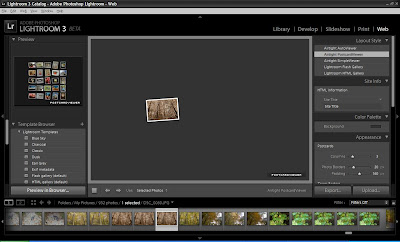
We've had a chance to take a look at some of the features of Lightroom 3 over the past couple weeks and I wanted to touch on the last module, the "Web" module.
This module will assist you in preparing your photos in a collection to display on your website.
The first thing you'll want to do is click on the Web module in the upper right hand corner of the Lightroom 3 interface.
Once there it is as easy as choosing your photos, choosing a template / format to display them in and then customizing your site with things like title, description, contact information and many more options.
The first thing I did was to choose my Collection of random photos from the photo browser window near the bottom of the Lightroom 3 interface.

You can select multiple photos by holding the CTRL key and clicking on them. Under the "Use" option just above this drop down you can choose to use selected photos or an entire Collection.
Once you've selected your photos, you can choose the Layout Style in the top right hand side of the screen.
The options for layout styles are;



This module will assist you in preparing your photos in a collection to display on your website.
The first thing you'll want to do is click on the Web module in the upper right hand corner of the Lightroom 3 interface.
Once there it is as easy as choosing your photos, choosing a template / format to display them in and then customizing your site with things like title, description, contact information and many more options.
The first thing I did was to choose my Collection of random photos from the photo browser window near the bottom of the Lightroom 3 interface.

You can select multiple photos by holding the CTRL key and clicking on them. Under the "Use" option just above this drop down you can choose to use selected photos or an entire Collection.
Once you've selected your photos, you can choose the Layout Style in the top right hand side of the screen.
The options for layout styles are;
Airtight AutoViewer - a self contained look, one picture at a time, sliding right to left.

Airtight Postcard Viewer - similar to the one above, but it will have the photos looking as if they are scattered on a table, mouse over and they get larger and move, click on them to view in a similar style to the above layout style, click on them again to return to the postcard view.

Airtight Simple Viewer - a simple layout style with the photo thumbnails on the left, and selected photo in larger view on the right. Click to view full photo, click again to return to the main screen.

Lightroom Flash Gallery - This layout style offers very clean Flash based designs for the photo gallery. On the left hand side you can choose between many different templates for a custom look. The one pictured below is the Default Flash Gallery template, but there are many others to choose from... I'll show you the one I created at the bottom of the post.

Lightroom HTML Gallery - don't let this one fool you, there are some nice HTML Gallery templates that can be customized to come up with a very unique and stylish design.
Once you've selected your Layout Style, you can then set a myriad of options such as;
Site Info - set the name of the site, title of the collection and list contact information
Color Pallette - customize the look of the gallery site by changing border, title, text color and more
Appearance - change the look and feel of the thumbnails and full size photos
Image Info - choose to list the photo Title and Caption or other information about the photo such as exposure or other available image information fields
Output Settings - set copyright information, watermarks and sharepening
Upload Settings - setup your server connections to upload the final product directly from Lightroom to your site
Note: Be sure to select your template style before editing the above information. Choosing a new style afterwards will set all above information back to the default settings for the template.
Now that you've selected your template and edited the options to your liking, it's time to publish that masterpiece to the web. As long as you have all your connection information setup, just click Upload and then sit back and wait as Lightroom creates your site and uploads all necessary files to your server.
It can take a bit depending on how many photos you have selected and based on the output settings you have chosen. My site took approximately 30 minutes for Lightroom to create and publish.

Click here to see the live version.
Lightroom 3 has many great features that make it easy for a photographer to organize, edit, manipulate, categorize, and publish in multiple formats. This will definitely be an application that I'll pick up when it finishes the beta. Until then - go ahead and grab a copy and experiment for yourself to see how useful this application can be... and feel free to drop me a line to let me know your tips and tricks.
Thursday, January 14, 2010
Photography Goals for 2010
A blog post over at Digital Photography School led me to start thinking a bit about what I'd like to accomplish this year with my trusty Nikon D50. I picked the camera up several years ago and I love almost everything about it. I find that because it's not the smallest camera, I'm not as inclined to take it everywhere with me. I also worry about tempature changes during the winter months. I do however want to do more with it this year than I have in any of the past years and I do enjoy myself when trying to get that "perfect" shot.
So - in the blog, the author lists 30 photographic goals that one could use as ideas for your goals for 2010.
Although I like all the ideas in the list - I'll offer up 10 photographic goals that I'm going to make for myself this year based on my favorites from the list.
I'll post monthly summary entries to let you know how I'm progressing toward the goals.
Happy Shooting!
So - in the blog, the author lists 30 photographic goals that one could use as ideas for your goals for 2010.
Although I like all the ideas in the list - I'll offer up 10 photographic goals that I'm going to make for myself this year based on my favorites from the list.
- Shoot a Photo a Day - I don't know that I could do this for an extended period of time, but I will do this through February to see what comes of it. I'm more of a photo shoot kind of person, but this will be fun as it will challenge me to find at least one subject each day through the shortest month of the year. :)
- Prioritize your Goals - I like this idea. I think it would be good for me to sit down and give some thought to finding out what I enjoy most about photography and then making a plan to devote more time to it. I'd also like to save for a new Nikkor Lens this year.
- Read a book per month - Again, I think this is a great goal to strive towards. With so many areas to focus in on (no pun intended) it should be easy to achieve this goal. I'll post each month's book reviews up on this site.
- Join or Start a Photo Club - I'll look around the Washtenaw area and see what I can find. This will be a great way to get some advice and learn from others!
- Share Online - this is something that I haven't been great at... I'm probably way to critical and I just need to share my pictures with others. As you may have seen in a previous post, I've been working with Adobe Lightroom 3 and I really like it. The ability to publish to Flickr makes it easy to accomplish this goal.
- Create a Photo Book per Month - Well, a photo book per month may be a bit much, I will follow through with this one and set a goal to create at least two photo books this year. If it goes well and I enjoy the final work, maybe I'll make more.
- Get Published - This is by far the loftiest goal on the list. First - it assumes that my work will be worthy of being published. It's a good thing I still have eleven months to figure out how to accomplish this goal.
- Develop a Post Processing Workflow - this will be key if I want to be able to capture the best pictures from a photo shoot and share them with minimal amount of effort. I will spend time this month and next developing the way that works best for me.
- Make Personal Post Cards - This will be the goal that I'll tackle in the month of January. I received several Christmas Cards in 2009 from friends and family members and I didn't make the time to send cards back. I want to give a personal thank you to each person and I think this may be a great way to show that I really appreciated the effort of my loved ones.
- Take a Workshop - Yes, there is so much to learn! I plan on taking a workshop, perhaps locally or maybe a photo trip to another state.
I'll post monthly summary entries to let you know how I'm progressing toward the goals.
Happy Shooting!
Wednesday, January 13, 2010
February is Album Writing Month
February is Album Writing Month!
Do you think you're up to the challenge of writing 14 tunes in 28 days? If so, check it out.
For some history / more information - wikipedia can help out.
If you're not into writing an album, maybe you want to challenge yourself in different creative ways?
Let me know if you participate in any of these events, it would be great to track your progress.
Do you think you're up to the challenge of writing 14 tunes in 28 days? If so, check it out.
For some history / more information - wikipedia can help out.
If you're not into writing an album, maybe you want to challenge yourself in different creative ways?
Let me know if you participate in any of these events, it would be great to track your progress.
Tuesday, January 12, 2010
Exercising the Hand...
No - it's not what you think. Wow - get your mind out of the gutter....
I picked up the ProHands Grip Master Hand Exerciser. It promises to help with hand control and speed for playing instruments.

Take a look when you have a chance. I like it - I think I should have got the lowest resistance first though, because this thing is kicking my hand's ass. :)
I picked up the ProHands Grip Master Hand Exerciser. It promises to help with hand control and speed for playing instruments.

Take a look when you have a chance. I like it - I think I should have got the lowest resistance first though, because this thing is kicking my hand's ass. :)
Monday, January 11, 2010
site: Vintage Ad Browser
I love the look of older advertising. It brings you back to another time and gives you a glimpse into Marketing campaigns and call to action methods that may have worked through the generations.
Check out Vintage Ad Browser when you have time.
Check out Vintage Ad Browser when you have time.
Sunday, January 10, 2010
Lightroom 3 Beta : Part Two
In the last post I took a first look at Adobe's Lightroom 3, a product that you can grab in Beta from the Adobe Labs website. I was impressed by the layout of the user interface, the look was pleasing and it was pretty easy to find out how to perform tasks with little guidance.
The application is setup in five major modules; Library, Develop, Slideshow, Print, and Web. I took a quick look at the first two modules in my first post. I would like to tell you a little bit more about each of the modules now that I've had more time with Lightroom.
I'm finding that the library is a great way to organize photos. An average photo shoot will result in several hundred photos, of which I'm pretty happy if I get one great photo. (I'm hoping that the more practice I get the better I'll get at shooting, but I'll be the first to tell you that it's pretty much dumb luck right now).
As I was saying, I'll take multiple shots of one target and usually get one that I like better than others. Maybe the lighting changed a bit between shots or I moved just a bit to get a better angle... there are many reasons why I'll have more than one shot of the same target in a photo shoot. Lightroom has many ways to look at your catalog of photos. The default view is the Grid View, there is also a Loupe View for looking at one photo at a time, a Compare View and a Survey View (I'll go a bit more into this view and options for flagging in the next blog post). I wanted to touch on Compare view because this nice feature let's you compare photos side by side. When in the Library module, select your photos, using CTRL to select multiple and then choose the X|Y button. This will allow you quickly tell which of the photos you like best.


The application is setup in five major modules; Library, Develop, Slideshow, Print, and Web. I took a quick look at the first two modules in my first post. I would like to tell you a little bit more about each of the modules now that I've had more time with Lightroom.
I'm finding that the library is a great way to organize photos. An average photo shoot will result in several hundred photos, of which I'm pretty happy if I get one great photo. (I'm hoping that the more practice I get the better I'll get at shooting, but I'll be the first to tell you that it's pretty much dumb luck right now).
As I was saying, I'll take multiple shots of one target and usually get one that I like better than others. Maybe the lighting changed a bit between shots or I moved just a bit to get a better angle... there are many reasons why I'll have more than one shot of the same target in a photo shoot. Lightroom has many ways to look at your catalog of photos. The default view is the Grid View, there is also a Loupe View for looking at one photo at a time, a Compare View and a Survey View (I'll go a bit more into this view and options for flagging in the next blog post). I wanted to touch on Compare view because this nice feature let's you compare photos side by side. When in the Library module, select your photos, using CTRL to select multiple and then choose the X|Y button. This will allow you quickly tell which of the photos you like best.

Once I was able to identify the photos that I wanted to organize into an area where I could re-visit at a later time, I found that within the Library module there is a way to catalog / organize photos into Collections. Collections are a great way for me to go through my entire catalog and sort photos from specific photo shoots into organized groupings. Below I created a new Collection called "Randoms". To group a photo or multiple photos into a Collection, select the photos and then click the Collection drop down icon and choose "New Collection", you'll be asked to name the Collection and have the option of adding the selected photos.

Another option on the Library module is located under the main Navigator and is called "Publish Services". This caught my eye as I noticed that there were options for "Hard Drive", which I believe is a basic export locally, and the other was the ability to publish to Flickr. After a little bit, I remembered my Flickr account password and I was able to setup the connection for Lightroom to publish directly to my Flickr Photostream. I did have to verify through Flickr that I wanted Lightroom to be able to do this, but once I did that it was as easy as putting in my login and password and choosing a default naming convention and publishing location.

With this feature setup, I was able to drag and drop a photo on the "Photostream" line under the Flickr Publishing Service and once I did that it is queued up for publishing. Choose publish and as you can see in the photo above, there is a status bar above the Navigator that let's you know the progress of the upload. This was an easy feature to setup and I could see how users of Flickr would like this integration. I can only imagine that other Publishing Services will be added in the future, things like TwitPic, Facebook, etc.
While I was working within the publishing / sharing part of Lightroom, it had me thinking about the other modules, so I moved on to the Slideshow module.

This module is pretty straight forward, you want to show a collection of photos in sequence. Select your photos, select from a default list of templates or customize to fit your needs, adjust options such as watermark information, shadowing, and many other options, perhaps add a soundtrack and your done. Publishing output gives you two options, MP4 and PDF.
Within the Print module, you can print your photos. Go figure! The best part about this is the ease of which you can choose popular templates to print your photos in... just like the types that photographers offer in professional packages. You can mix and match photos into a custom package, or print multiple sizes of the same photo easily, as shown below.

The last module is the Web module and it's by far the most exciting to me since it allows you to create Flash enabled pages to show off your work. I'll go deeper into this section and more features to organize your photos on my next Lightroom post.
So far - I really like what Adobe Lightroom has to offer the photo hobbyist and professional photographer.
Saturday, January 09, 2010
Rockin' out with the new Line 6 Spider IV
I recently picked up a new guitar amp called the Spider IV, from Line 6. I was speaking to Andy about picking a new one up and then perhaps selling my older Line 6 AX2-212.
Today I finally unpacked the amp and set it up in the recording room.


Today I finally unpacked the amp and set it up in the recording room.

The first thing I noticed after setting it up and plugging in was how awesome this amp sounds. It's very loud (75W), but crystal clear and the tones are just amazing. It makes me want to play and keep playing.
The next thing that caught my attention is the amount of options on this unit.

The unit comes with over 250 artist and song presets. Yup, you read it right... feel like jamming out to AC/DC's "Back in Black" - there's a preset for it, tune to it and this amp will digitally model the amp and settings that were used for the guitar track of the song. Don't worry though - it's not like Line 6 ties the hands of your creativity at all, each of these presets can be edited and saved as user presets. This is going to be really fun to experiment with...

Other features that make this amp attractive are CD / MP3 input that will allow you to jam along with your favorite tracks while playing them through the amp, ability to record using a direct out, built in tuner, foot control using one of the available foot boards (which I picked up as well, but I'll post another blog when I've had time to play with it a bit), built in Looper (frickin' love this feature!), and auto FX such as smart pitch shifter, auto-wah and more.
The Looper allows you to turn this amp into a sequencer, which is great for coming up with rhythm and lead parts and seeing how they sound before actually recording them. It may also make it interesting for being able to do some live show looping.
Below is the older Line 6 amp, which I think I'm going to keep for a while longer, but I have a feeling that the Spider IV will be the amp of choice when practicing.

Rock on!
Friday, January 08, 2010
site: SongU
Have you wanted to learn more about the craft of songwriting? Perhaps you're already a songwriter and you'd like to learn more about the following topics;
From the website -
- Song Structure
- Lyric Writing
- Composing on Guitar
- Promoting Yourself as an Artist
- Creating and Submitting a Demo
From the website -
What is SongU.com?
SongU.com provides a unique opportunity to study songwriting with award-winning songwriters, make industry connections, and pitch your songs all from the comfort of your own home computer. With our user-friendly site, you do not need special computer skills or a high tech setup. At SongU.com, wherever you are...we'll bring the music industry to you.
Thursday, January 07, 2010
Time to get the office in order...
I hooked up the new Linksys Wireless Broadband Router yesterday and it worked like a charm, allowing me to roam around with my laptop and browse the internet at blazing speeds... well ok ... not blazing, but not terrible either. Here's an example from my office computer;

I love my ATT 3G Broadband card. When I'm on the go, there is nothing like being connected. Sure at home it's butt slow, but I'm in a pretty remote area... no cable services, heck ATT doesn't even offer DSL out here. When compared against the price of satellite internet - the value was much better with Mobile Broadband.
Tonight I installed my D-Link Wireless PCI card into my desktop computer in the office. I was expecting to have to do some configuration since it had been a while since I'd used it, but it installed smoothly and found the wireless network and connected without problem. Now I have internet in the office as well!
So, I'm sitting here thinking... if I'm going to get comfortable and get back into the office, I might need to upgrade my monitor. I've got a 15" KDS Rad-5. It's an older monitor, but up till now it has done the job nicely. I think I can get a decent monitor now for under $200.
Let the hunt begin!
I love my ATT 3G Broadband card. When I'm on the go, there is nothing like being connected. Sure at home it's butt slow, but I'm in a pretty remote area... no cable services, heck ATT doesn't even offer DSL out here. When compared against the price of satellite internet - the value was much better with Mobile Broadband.
Tonight I installed my D-Link Wireless PCI card into my desktop computer in the office. I was expecting to have to do some configuration since it had been a while since I'd used it, but it installed smoothly and found the wireless network and connected without problem. Now I have internet in the office as well!
So, I'm sitting here thinking... if I'm going to get comfortable and get back into the office, I might need to upgrade my monitor. I've got a 15" KDS Rad-5. It's an older monitor, but up till now it has done the job nicely. I think I can get a decent monitor now for under $200.
Let the hunt begin!
Wednesday, January 06, 2010
site: GDGT
Want to track the latest news about all the hot gadgets coming out? How about interact with others who have the same gadgets you do? That's where gdgt.com comes in.
Here is the link.
I've added a couple of the gadgets I used to have and one that I currently have... I think it might take me a bit to get everything in there, but once it is, it will be a nice inventory of tech gadgets and resources for them.
Here is the link.
I've added a couple of the gadgets I used to have and one that I currently have... I think it might take me a bit to get everything in there, but once it is, it will be a nice inventory of tech gadgets and resources for them.
Tuesday, January 05, 2010
site: This Recording
I figured I would share this site with you. Maybe I've been under a rock (ok - or in a bar seat) too long to have noticed cool sites, but the content of this site caught my eye and made me feel a bit uncomfortable all at once. I kinda liked it. :)
http://thisrecording.com/today/2009/7/10/in-which-boy-meets-world-changes-our-understanding-of-cory-s.html
Enjoy.
http://thisrecording.com/today/2009/7/10/in-which-boy-meets-world-changes-our-understanding-of-cory-s.html
Enjoy.
Monday, January 04, 2010
Getting organized with Lightroom 3 Beta
I downloaded Adobe Lightroom 3 Beta today and I'm checking it out this evening. The first thing I noticed was how nice the interface is laid out.

Of course upon install and launch a nice brief tutorial screen walked me through what I can accomplish with the application. Once done, it searched my hard drive and imported in all my pictures.
The bottom of the screen has a nice horizontal scroll bar for easy thumbnail viewing of my entire collection. Double click on a photo to select it and once you do that you have a variety of options that will allow you to categorize your photos using keywords or edit your photos with Quick Develop options; White Balance and Tone Control. It took no time for me to tweak a few settings to have a photo looking very nice and add in keywords so that I'll be able to reference this photo in future searches and find it easily.


I can tell that this is going to be an application that I'm going to enjoy spending a bit of time with... I'll take a deeper look at the Develop screen and move on to the other modules tomorrow, which focus on how to share and publish your work.

Of course upon install and launch a nice brief tutorial screen walked me through what I can accomplish with the application. Once done, it searched my hard drive and imported in all my pictures.
The bottom of the screen has a nice horizontal scroll bar for easy thumbnail viewing of my entire collection. Double click on a photo to select it and once you do that you have a variety of options that will allow you to categorize your photos using keywords or edit your photos with Quick Develop options; White Balance and Tone Control. It took no time for me to tweak a few settings to have a photo looking very nice and add in keywords so that I'll be able to reference this photo in future searches and find it easily.

The Library Module, which is the default module when the application is loaded allows you to do what was explained above. When clicking on the Develop module, you'll move into a world where an amazing variety of tools are laid out to let you edit your photo. Options to change exposure, lighting, detail, lens corrections, add effects, the options seem endless at first glance.

I can tell that this is going to be an application that I'm going to enjoy spending a bit of time with... I'll take a deeper look at the Develop screen and move on to the other modules tomorrow, which focus on how to share and publish your work.
Sunday, January 03, 2010
Hello Flex, how have you been?
I've been a fan and an avid user of Macromedia's (now Adobe) line of web products. I began using Macromedia Flash in version 3, Dreamweaver at version 2, Cold Fusion when it was still owned by Allaire, , and was founder of the Ann Arbor Macromedia User Group (now FlashFocused - Ann Arbor Flash Platform User Group and headed by Misty Mills).
I was extremely excited to see products such as Captivate, Breeze, Flash Communication Server and Flex launch, and I participated in many of these product beta programs.
I was a bit crushed when Adobe purchased Macromedia in 2005, and shortly after my career took a change which had me doing more IT Management and Project Management work than web design and development.
Adobe has done a great job keeping the programs I loved alive and kicking. I was extremely excited to hear that Adobe Flex was now about to be at Version 4! I decided it was time that I became familiar with my old favorites and so I went and purchased Peter Armstrong's "Hello! Flex 4" book in eBook format. This book is in workshop format and I hope to work through it this week and next and leave my thoughts on the book and Adobe Flex 4 in general on this blog.
After I'm done with the workshop, I plan to use the Adobe Flex SDK to build an application to track vendor and software / hardware maintenance contracts. This will help me in my current job at Thomson Reuters and will also allow me to become proficient with an application that I really enjoyed before I took a break from the web work that I was doing from 2000 - 2005.
Hello Adobe Flex, how have you been?
I was extremely excited to see products such as Captivate, Breeze, Flash Communication Server and Flex launch, and I participated in many of these product beta programs.
I was a bit crushed when Adobe purchased Macromedia in 2005, and shortly after my career took a change which had me doing more IT Management and Project Management work than web design and development.
Adobe has done a great job keeping the programs I loved alive and kicking. I was extremely excited to hear that Adobe Flex was now about to be at Version 4! I decided it was time that I became familiar with my old favorites and so I went and purchased Peter Armstrong's "Hello! Flex 4" book in eBook format. This book is in workshop format and I hope to work through it this week and next and leave my thoughts on the book and Adobe Flex 4 in general on this blog.
After I'm done with the workshop, I plan to use the Adobe Flex SDK to build an application to track vendor and software / hardware maintenance contracts. This will help me in my current job at Thomson Reuters and will also allow me to become proficient with an application that I really enjoyed before I took a break from the web work that I was doing from 2000 - 2005.
Hello Adobe Flex, how have you been?
Saturday, January 02, 2010
Web Texting
Last year I had a couple friends that would like to text me to stay in touch. If I'm being honest, I actually warmed up to texting. It was an extremely easy way for me to find out what friends were doing and get a quick answer to a question such as the ingredients to one of my favorite drinks. I have AT&T Broadband Wireless service and a Sierra Wireless 881 PCMCIA card that I would use to send texts. I found that I had a charge of $0.20 per text. Until I found this great little service.
Joopz allows you to register your number with them and send out texts from a web interface. They must use a shared pool of SMS accounts to send the messages from as I've heard from friends that one downside is that it doesn't always come from my phone number (I think this is just a glitch in the software, I would imagine that it should insert your number in the "from" field, almost a form of spoofing an SMS number). This is ok to me though, because as friends reply it returns to the Joopz pooled accounts and then finds it's way back to me. The best part about this is that I can text (sometimes) delivering it as my number, and I don't get charged for sending or receiving texts through my AT&T service.
Joopz let's you send 50 free incoming / outgoing texts per month, or you can sign up for $20 for the year of unlimited texting!

It's worked pretty well for me. Sure I don't get incoming texts as fast as I used to, since I have to check the web interface to see if anyone has responded to an open conversation, but for the price, it works for me!
Joopz allows you to register your number with them and send out texts from a web interface. They must use a shared pool of SMS accounts to send the messages from as I've heard from friends that one downside is that it doesn't always come from my phone number (I think this is just a glitch in the software, I would imagine that it should insert your number in the "from" field, almost a form of spoofing an SMS number). This is ok to me though, because as friends reply it returns to the Joopz pooled accounts and then finds it's way back to me. The best part about this is that I can text (sometimes) delivering it as my number, and I don't get charged for sending or receiving texts through my AT&T service.
Joopz let's you send 50 free incoming / outgoing texts per month, or you can sign up for $20 for the year of unlimited texting!

It's worked pretty well for me. Sure I don't get incoming texts as fast as I used to, since I have to check the web interface to see if anyone has responded to an open conversation, but for the price, it works for me!
Friday, January 01, 2010
Daddy plays the Squeeze Box, Mama never sleeps at night...
I found this little gadget more than a couple years ago. In fact, there is a blog post on this blog about getting one of these if I ever owned a house. Well - it's been three years that I've had the homestead... I think it's time to pick one up.
Thursday, December 31, 2009
Latest Toy... extending the 3G love...
I decided to pick up a Linksys Broadband Router today at Amazon.com. This little thing will allow me to plug in my AT&T Broadband Wireless card and extend the love to other devices in my home that have been internet starved.
Once it arrives I'll let you know how the configuration and setup pans out as well as speed tests. I'm in a very remote area, so wireless signals on my broadband card are not very great.
Once it arrives I'll let you know how the configuration and setup pans out as well as speed tests. I'm in a very remote area, so wireless signals on my broadband card are not very great.
Tuesday, December 29, 2009
Adobe still rocks... and I haven't forgotten...
See how Adobe products were used in the creation of the latest hit film "Avatar".
http://forta.com/blog/index.cfm/2009/12/21/What-Adobe-Products-Were-Used-To-Create-Avatar
http://forta.com/blog/index.cfm/2009/12/21/What-Adobe-Products-Were-Used-To-Create-Avatar
Don't call it a comeback... I've been here for years...
I'm not sure why I love using this blog title, I guess it dates me a bit, back to the days of LL Cool J on my boombox radio (that I could not live without) and it brings back good memories.
Speaking of memories, we're almost through 2009 and I'm going to start using this blog for 2010 goals and activities. So - stay tuned, more to come.
Speaking of memories, we're almost through 2009 and I'm going to start using this blog for 2010 goals and activities. So - stay tuned, more to come.
Thursday, January 25, 2007
Nice Websites
These websites have really caught my eye and I have to give props!
Very nicely designed.
http://www.tnvacation.com/
http://www.bnlmusic.com
Very nicely designed.
http://www.tnvacation.com/
http://www.bnlmusic.com
Tuesday, January 02, 2007
Monday, November 13, 2006
Finding the perfect house - Step By Step
You'd think that this would be an easy process, right? You've saved up some money - or maybe you hit the lotto and you've got cash to burn! A house will most likely be one of the largest and best investments that you'll make in your lifetime. What an exciting time!
Step 1 - Find a realtor
Believe it or not, these guys can come in quite handy for getting you in-depth information regarding the house you are researching that Realtor.com won't list. When dealing with a realtor - if you are just buying a house, not selling, then you'll have to sign a "Buyer Agreement" with said Realtor, which basically just allows this realtor to work on your behalf during negotiations and such. The Realtor in this case would be known as the "Buyer's Agent". This is the situation I went with as I am currently living in an apartment.
Step 2 - Tell your realtor what type of house you want
Give as much detail to your realtor as possible about the type of house you want. Notice I did not say need, you should basically give the description of your dream house to your realtor. An example might be - brick ranch, with basement and two car attached garage, at least 1500 sq ft in size, on 2 acres of land, three bedrooms, two baths, fireplace and a pool! The more info that you give them, the more they'll be able to find.
Step 3 - Prepare to be flexible
Not all the listings that you're realtor will send you will meet your dream house criteria. At some point you'll have to prioritize what is "really" important to you and then you'll come up with the list of "needs"
NOTE: A good realtor will be sending you listings everyday - or at very least every two days.
Step 4 - Driving it home!
Once a realtor sends you a listing, you may want to do a drive by of the house to take a look at the outside condition as well as finding out what the neighborhood is like - there were quite a few listings that looked great on the web and looked like hell when I drove by them. A good rule of thumb for the neighborhood is to ask yourself these questions...
Living next to the liquor store my be a sure sign that this is NOT the place for you!
Step 5 - The Walkthrough
Ah, what a wonderful time this can be... the homeowner and the selling agent have hyped up this house as much as possible, so be ready!
Interesting points that I've learned;
1) Full basement doesn't mean finished or even mean that it is a basement you can live in. I walked through a house that listed "Full Basement" and found that it was 5 feet tall, no good for a guy who is 6'3" tall.
2) TLC usually means Tender Loving Care, but might as well mean Take Lotsa Cash or Total Loss Case because unless you are a contractor; the skill / money it will take to fix these houses up will break you faster than Drago broke Apollo Creed.
3) "Minor" is a MAJOR word. Minor damage should equate to "replace". I walked through a house that had "minor foundation work needed" which turned out to be a fifteen foot crack in the block foundation, about an inch thick.
4) Ignore descriptive words like "spacious" or "open concept" until you really see the place. Spacious apparently means something different to each person - I walked through "spacious" kitchens that were smaller than a walk-in closet.
5) "Water view" could mean that you have to be holding binoculars to "view" the water.
6) "All appliances included" usually means that the appliances are so old that the seller is buying new ones, or they can't physically get them out of the house.
There are many more - but I'll let you discover them on your own and I think you're getting my point.
Be sure to ask your realtor to have the house empty when you walk through - and by that I mean asking the current owners to not be present. The reason is simple, you don't want them to influence your decision about the overall feel or condition of the house. I walked through a house where the owner was present and he basically had a bit of a nervous breakdown while showing us the place, talking about why he loved the house so much and why he didn't want to leave but was "f-ing" forced to... and let me say it was not a comfortable situation.
There will be a time when you walk through a house and you just fall in love. It's perfect and you can see yourself living there! The picture below is the one that I found.

The next post will talk about what comes after you've found that perfect house... and how you just might find out how imperfect it really is...
Cheers!
Step 1 - Find a realtor
Believe it or not, these guys can come in quite handy for getting you in-depth information regarding the house you are researching that Realtor.com won't list. When dealing with a realtor - if you are just buying a house, not selling, then you'll have to sign a "Buyer Agreement" with said Realtor, which basically just allows this realtor to work on your behalf during negotiations and such. The Realtor in this case would be known as the "Buyer's Agent". This is the situation I went with as I am currently living in an apartment.
Step 2 - Tell your realtor what type of house you want
Give as much detail to your realtor as possible about the type of house you want. Notice I did not say need, you should basically give the description of your dream house to your realtor. An example might be - brick ranch, with basement and two car attached garage, at least 1500 sq ft in size, on 2 acres of land, three bedrooms, two baths, fireplace and a pool! The more info that you give them, the more they'll be able to find.
Step 3 - Prepare to be flexible
Not all the listings that you're realtor will send you will meet your dream house criteria. At some point you'll have to prioritize what is "really" important to you and then you'll come up with the list of "needs"
NOTE: A good realtor will be sending you listings everyday - or at very least every two days.
Step 4 - Driving it home!
Once a realtor sends you a listing, you may want to do a drive by of the house to take a look at the outside condition as well as finding out what the neighborhood is like - there were quite a few listings that looked great on the web and looked like hell when I drove by them. A good rule of thumb for the neighborhood is to ask yourself these questions...
Would I feel good about having my parents come to see me in this place?
Would I feel safe about having my kids play outside in this area?
Living next to the liquor store my be a sure sign that this is NOT the place for you!
Step 5 - The Walkthrough
Ah, what a wonderful time this can be... the homeowner and the selling agent have hyped up this house as much as possible, so be ready!
Interesting points that I've learned;
1) Full basement doesn't mean finished or even mean that it is a basement you can live in. I walked through a house that listed "Full Basement" and found that it was 5 feet tall, no good for a guy who is 6'3" tall.
2) TLC usually means Tender Loving Care, but might as well mean Take Lotsa Cash or Total Loss Case because unless you are a contractor; the skill / money it will take to fix these houses up will break you faster than Drago broke Apollo Creed.
3) "Minor" is a MAJOR word. Minor damage should equate to "replace". I walked through a house that had "minor foundation work needed" which turned out to be a fifteen foot crack in the block foundation, about an inch thick.
4) Ignore descriptive words like "spacious" or "open concept" until you really see the place. Spacious apparently means something different to each person - I walked through "spacious" kitchens that were smaller than a walk-in closet.
5) "Water view" could mean that you have to be holding binoculars to "view" the water.
6) "All appliances included" usually means that the appliances are so old that the seller is buying new ones, or they can't physically get them out of the house.
There are many more - but I'll let you discover them on your own and I think you're getting my point.
Be sure to ask your realtor to have the house empty when you walk through - and by that I mean asking the current owners to not be present. The reason is simple, you don't want them to influence your decision about the overall feel or condition of the house. I walked through a house where the owner was present and he basically had a bit of a nervous breakdown while showing us the place, talking about why he loved the house so much and why he didn't want to leave but was "f-ing" forced to... and let me say it was not a comfortable situation.
There will be a time when you walk through a house and you just fall in love. It's perfect and you can see yourself living there! The picture below is the one that I found.
The next post will talk about what comes after you've found that perfect house... and how you just might find out how imperfect it really is...
Cheers!
Adventures in Home Buying
Sorry I haven't posted in quite a while - the reason is simple, my work permit has changed and I decided that it was time that I made a more permanent move to the US of A and bought a house.
Let me be the first to tell you that the home purchasing experience has been by far one of the worst events of my life. It has caused me more stress, loss of sleep and general anxiety than I ever thought it would.
I'm going to post about my experiences here and hopefully document my process / experience so that you never have to go through the same craziness that I have been through. I'll even give some tips on how much money you should really have "on hand" and some traps to avoid.
As it stands right now - I'm supposed to be closing on my first house this Thursday afternoon at 3:00pm. First - we need to start with what it's taken to get to this point.
Let me be the first to tell you that the home purchasing experience has been by far one of the worst events of my life. It has caused me more stress, loss of sleep and general anxiety than I ever thought it would.
I'm going to post about my experiences here and hopefully document my process / experience so that you never have to go through the same craziness that I have been through. I'll even give some tips on how much money you should really have "on hand" and some traps to avoid.
As it stands right now - I'm supposed to be closing on my first house this Thursday afternoon at 3:00pm. First - we need to start with what it's taken to get to this point.
Tuesday, September 26, 2006
Balboa is BACK
This christmas, while you're opening up your new gifts - you'll have a chance to see another Rocky movie! Aw yeah. I thought it was going to be possibly a match against his son, but nope - the overall premise of the movie is around a computer simulation that is broadcast on the news one day that can choose any two fighters at their prime and simulate the result. Pitching the current champion against Balboa the computer says that Rocky would win. This, of course, damages the ego of the current champ, gets Rocky reminscing and sets the perfect scene for a comeback of let's say a hmm... 60 year oldish fighter? Interesting. It's been done by younger. Look at George Foreman!
Ah well... either way - it's a Rocky movie. I'd be there if it was Rocky vs. Godzilla, Rocky vs. Bush, Rocky vs. SpongeBob ... I'll certainly be there to check this one out. Do I have high hopes of it being a fantastic movie that could compete with Rocky I - IV, no - I'm not an idiot.
Watch the trailer - http://rocky.com/
Ah well... either way - it's a Rocky movie. I'd be there if it was Rocky vs. Godzilla, Rocky vs. Bush, Rocky vs. SpongeBob ... I'll certainly be there to check this one out. Do I have high hopes of it being a fantastic movie that could compete with Rocky I - IV, no - I'm not an idiot.
Watch the trailer - http://rocky.com/
Wednesday, August 09, 2006
Wednesday, June 21, 2006
Nachooooooooooooooooooooooo!
Last night I decided to take in the new Jack Black movie, "Nacho Libre" from the Director of Napoleon Dynamite and I must say - I liked it.
Jack plays a Padre who believes that he was made to wrestle, which is looked upon as a sinful sport because of its fans following their favorite wrestler is similar to the worship of a false idol. He finds a way to make his dream come true by wrestling to win money for the orphan children who live with the
Jack's antics are in the style that you would expect, a little over the top and there are also quite a few jokes that you'll need to be paying attention to understand.
As with most movies that I watch - you must be in the right mood to enjoy this flick. If you go in with your expectations set to high, you might be disappointed. I arrived at the theater just hoping to have something take my mind off everything else that's been going on lately and this movie delivered. There were lulls where the story was slow - but then there would be parts that would keep you laughing for a while.
I must say that my favorite parts came when Jack would break into tune, Tenacious D style.
Overall - 3.5/5
Jack plays a Padre who believes that he was made to wrestle, which is looked upon as a sinful sport because of its fans following their favorite wrestler is similar to the worship of a false idol. He finds a way to make his dream come true by wrestling to win money for the orphan children who live with the
Jack's antics are in the style that you would expect, a little over the top and there are also quite a few jokes that you'll need to be paying attention to understand.
As with most movies that I watch - you must be in the right mood to enjoy this flick. If you go in with your expectations set to high, you might be disappointed. I arrived at the theater just hoping to have something take my mind off everything else that's been going on lately and this movie delivered. There were lulls where the story was slow - but then there would be parts that would keep you laughing for a while.
I must say that my favorite parts came when Jack would break into tune, Tenacious D style.
Overall - 3.5/5
Monday, June 19, 2006
Installing ColdFusion w/ Windows Remote Desktop
If you're installing ColdFusion over a remote connection on Windows 2003 and the installer package seems to start but then just stop - it could be because you have SP1 loaded to the server and DEP is now blocking you from running the executable.
Find out more info about the feature here:
http://support.microsoft.com/kb/875352
The workaround that I found was to log off and then remote back in, you should then be prompted with a popup window that will allow you some configuration options to allow the Installer package to run correctly.
Find out more info about the feature here:
http://support.microsoft.com/kb/875352
The workaround that I found was to log off and then remote back in, you should then be prompted with a popup window that will allow you some configuration options to allow the Installer package to run correctly.
Wednesday, June 14, 2006
In Search of the Right Road
I ran across this while looking at the Digital Photography School blog that I recently was introduced to by Garrett, one of my co-workers.
I found it very moving and thought I'd share it out. I think of myself as a compassionate person, but lately I've found myself being less caring and these pictures and audio made me appreciate what I have.
I found it very moving and thought I'd share it out. I think of myself as a compassionate person, but lately I've found myself being less caring and these pictures and audio made me appreciate what I have.
Vongo = No Go
This is my experience with the service Vongo, and why you should think twice about signing up for the service.
Last Thursday evening I decided to give Vongo a try. If you're unfamiliar with Vongo, it's a service that allows you to download "DVD Quality" movies to your computer to enjoy at your own leisure. The service cost is $9.99 per month and you can select movies from their extensive library of second rate movies.
I installed the software, there is a client install that is needed for this to work. Signed up for my account, gave my credit card info and was all set to go. They charged my card immediately for the service, there was no "FREE" trial.
I took a look at their movie listings and noticed right away that they had older, crappy movies available for the service price - but then had newer DVD release movies as a "pay per view" option. Oh and then I noticed that they were part of Starz and even offered a "view live feed" of Starz Network movies.
WTF?
So - I decided that I'd try and grab one of their older movies to at least check out the quality. Added a movie to my download manager, and BAM - nothing. It acted like it was trying to connect and then just dropped the movie out of queue. I tried this several more times with the same result. I tried the live feed option - and BAM - nothing!
At this point it was about 1am, so I decided to contact tech support, emailed through their contact form in the client software and was greeted with a message that said my issue was sent and that a representative would get back to me in 24 hours.
As of last night - I had heard nothing. No email, no call... nothing! That's 5 days - with no contact.
I decided that this was a big waste of time and effort, so I tried to cancel my account through the client software - which just tells you to call Customer Service to cancel your account.
I waited on the phone for 35 minutes, which was filled with an annoying "your call is important to us, please wait" - every 20 seconds! No information like what number I was in the queue or my approximate wait time.
Finally someone answered - and I was able to cancel the account.
This was by far the most unprofessional experience I've had with any company, next to Comcast.
Take my advice and steer very clear from this company and it's services, stick with reputable companies like NetFlix for your movie needs.
Last Thursday evening I decided to give Vongo a try. If you're unfamiliar with Vongo, it's a service that allows you to download "DVD Quality" movies to your computer to enjoy at your own leisure. The service cost is $9.99 per month and you can select movies from their extensive library of second rate movies.
I installed the software, there is a client install that is needed for this to work. Signed up for my account, gave my credit card info and was all set to go. They charged my card immediately for the service, there was no "FREE" trial.
I took a look at their movie listings and noticed right away that they had older, crappy movies available for the service price - but then had newer DVD release movies as a "pay per view" option. Oh and then I noticed that they were part of Starz and even offered a "view live feed" of Starz Network movies.
WTF?
So - I decided that I'd try and grab one of their older movies to at least check out the quality. Added a movie to my download manager, and BAM - nothing. It acted like it was trying to connect and then just dropped the movie out of queue. I tried this several more times with the same result. I tried the live feed option - and BAM - nothing!
At this point it was about 1am, so I decided to contact tech support, emailed through their contact form in the client software and was greeted with a message that said my issue was sent and that a representative would get back to me in 24 hours.
As of last night - I had heard nothing. No email, no call... nothing! That's 5 days - with no contact.
I decided that this was a big waste of time and effort, so I tried to cancel my account through the client software - which just tells you to call Customer Service to cancel your account.
I waited on the phone for 35 minutes, which was filled with an annoying "your call is important to us, please wait" - every 20 seconds! No information like what number I was in the queue or my approximate wait time.
Finally someone answered - and I was able to cancel the account.
This was by far the most unprofessional experience I've had with any company, next to Comcast.
Take my advice and steer very clear from this company and it's services, stick with reputable companies like NetFlix for your movie needs.
Monday, June 12, 2006
Tasting Model-Glue
No, this is the not the same model-glue that I used to eat in grade school, this is the framework for ColdFusion!
After watching Joe Rinehart's video tutorial that he did in preparation for Adobe Developer Week, I decided that it was really time to take a look at a framework to assist with my development projects.
To get started with this framework visit the website and grab the files.
Next - take a look at the QuickStart Guide - this is a sure way to get you up and running with Model-Glue in no time.
This is where I started.
I copied the application template directory and pasted it into my web root. Renamed the folder to my application name and made the changes as in the QuickStart Guide. I should make mention that I had to add these lines into the ModelGlue.xml file as they weren't there in the files that I had downloaded.

So - after making those changes and the change to the Application.cfm in the root of new application folder, I figured I was ready to go.
Launch browser... point to new application directory... BAM - Error.
For some reason it couldn't find the /ModelGlue/ModelGlue.cfm template.
Weird. Tried changing some things around and still couldn't get it to work.
Thought about it a bit more and thought I'd double check my mappings in my CF Administrator just to make sure that there wasn't some hokey mapping causing all my frustration. Well - there was!
I had a mapping for "/" set to my CFMX root instead of CFMX7 root.
Once I deleted that mapping, it worked like a charm!
Now it's time to turn one of my older applications into a lean, mean, Model-Glue fighting machine! I'll post about my experiences along the way.
Sunday, May 07, 2006
Music Sharing and a Different Look
Steven Page from BNL (one of my favorite musical groups of all time) speaks out about music sharing and how it's been around for a long time, just the technology in which the sharing happens has changed. He also speaks about the formation of the CMCC (Canadian Music Creators Coalition) and how they are taking back some of the control over their music. Overall a very nice breath of fresh air.
Page on Canada AM
Page on Canada AM
Friday, March 24, 2006
AjaxLaunch / AjaxWrite - thinkFlex!
Ajax is the craze, we all know this... it was the buzz word for 2005 and will continue to bring buzz in '06. The reason is because it allows and encourages the building of full blown web applications that act more like desktop software. No page refreshes, direct server connection for data refreshes in real time. Usually a short initial load time and then you're good to go!
Reading Slashdot today I read a post about AjaxLaunch.com creating web based applications that will compete with the office suites. They mention M$ - but in reality - it is designed to compete just as much with OpenOffice. They plan to launch a new application each week through this website - so keep it bookmarked and keep checking back often.
The first application that they've launched is called AjaxWrite and is a web based competitor for Word. Over a broadband connection it took about 15 seconds to load the application and delivered an application feel that was very similar to Wordpad. Toolbars were there and looked just like the Office toolbars, core functionality was already there and they've promised to keep building on it to add in the more advanced features. I was able to open up my M$ Word documents with a bit of formatting issues, make changes and then resave the file back down to my machine. Overall it just seems like another HTML editor - but there are HTML editors with more features out there already. I guess the selling feature is that it works with *.doc files - but since it doesn't have some of the more advanced features - it sometimes messes with your original documents.
With Office 2007 being delayed and planning to ship in 2007, that gives AjaxLaunch a great head start to get something up and running that may actually have people using it - although they have lots to do to get it up to something people will see real value in.
You know who this is really cool for? Adobe! What I don't feel has happened yet is that people haven't realized the powerful applications that you can create with Adobe Flex. However with Adobe announcing that Flex Data Services and the Flex SDK will be free when released out of beta it should get some attention. It's the fastest way to create applications that can tie in to your existing web application architecture and deliver a rich experience to your web customers.
If anything - Ajax will prove to web users that RIA's are not only the future but are definitely the way to go. Sooner or later web developers will also see that the fastest way to get up to speed with delivering RIA's that enhance the user's experience even more and take RIA's to the next level is the Adobe Flash Platform.
Reading Slashdot today I read a post about AjaxLaunch.com creating web based applications that will compete with the office suites. They mention M$ - but in reality - it is designed to compete just as much with OpenOffice. They plan to launch a new application each week through this website - so keep it bookmarked and keep checking back often.
The first application that they've launched is called AjaxWrite and is a web based competitor for Word. Over a broadband connection it took about 15 seconds to load the application and delivered an application feel that was very similar to Wordpad. Toolbars were there and looked just like the Office toolbars, core functionality was already there and they've promised to keep building on it to add in the more advanced features. I was able to open up my M$ Word documents with a bit of formatting issues, make changes and then resave the file back down to my machine. Overall it just seems like another HTML editor - but there are HTML editors with more features out there already. I guess the selling feature is that it works with *.doc files - but since it doesn't have some of the more advanced features - it sometimes messes with your original documents.
With Office 2007 being delayed and planning to ship in 2007, that gives AjaxLaunch a great head start to get something up and running that may actually have people using it - although they have lots to do to get it up to something people will see real value in.
You know who this is really cool for? Adobe! What I don't feel has happened yet is that people haven't realized the powerful applications that you can create with Adobe Flex. However with Adobe announcing that Flex Data Services and the Flex SDK will be free when released out of beta it should get some attention. It's the fastest way to create applications that can tie in to your existing web application architecture and deliver a rich experience to your web customers.
If anything - Ajax will prove to web users that RIA's are not only the future but are definitely the way to go. Sooner or later web developers will also see that the fastest way to get up to speed with delivering RIA's that enhance the user's experience even more and take RIA's to the next level is the Adobe Flash Platform.
Thursday, February 23, 2006
Party in the Potty
Do you feel the need to jam in the shower? Do you wish that you had some tunes kickin' while you "downed what you got!"...
Check out this great review at Alan Williamson's site.
http://alan.blog-city.com/slim_devices_squeezebox.htm
When I get my first house - I'm SO getting one of these!
Check out this great review at Alan Williamson's site.
http://alan.blog-city.com/slim_devices_squeezebox.htm
When I get my first house - I'm SO getting one of these!
Monday, February 20, 2006
Top Ten Reasons I Love Being Single
With Valentine's Day just passing, I couldn't help but notice the extra stress it put on my friends. I also couldn't help but notice how I could have cared less about the day - to me, it was Tuesday, end of story. This got me thinking though, about how much I enjoy being single, and without further adieu, here are the top ten reasons (in no specific order) why I LOVE being single!
10. If I want a PSP - I get a PSP.
9. The tempature in my apartment is set to MY comfort level
8. If I sleep in / am late for work / take a day off - it affects only me.
7. I don't get told when to "come to bed"
6. When I do go to bed, I get just as many blankets as I'd like, no more - no less
5. If I'd like to go see a movie, guess which one I'll go and see? Yup - the one I want to...
4. I don't have to ask permission to play a video game
3. I don't have to feel guilt about hanging out with the boys
2. I don't get in trouble when I forget "certain dates"
1. If I want quiet time, I'm able to have it without being pestered with questions like "whatcha thinking about" - which, by the way ladies, when you're guy answers "nothing" - that's what he really means, so stop analyzing the crap out of everything.
10. If I want a PSP - I get a PSP.
9. The tempature in my apartment is set to MY comfort level
8. If I sleep in / am late for work / take a day off - it affects only me.
7. I don't get told when to "come to bed"
6. When I do go to bed, I get just as many blankets as I'd like, no more - no less
5. If I'd like to go see a movie, guess which one I'll go and see? Yup - the one I want to...
4. I don't have to ask permission to play a video game
3. I don't have to feel guilt about hanging out with the boys
2. I don't get in trouble when I forget "certain dates"
1. If I want quiet time, I'm able to have it without being pestered with questions like "whatcha thinking about" - which, by the way ladies, when you're guy answers "nothing" - that's what he really means, so stop analyzing the crap out of everything.
Thursday, February 02, 2006
Hometown Lovin'
Well - my hometown got some great press on ESPN today.
http://sports.espn.go.com/nfl/playoffs05/news/story?id=2316573
http://sports.espn.go.com/nfl/playoffs05/news/story?id=2316573
Wednesday, February 01, 2006
Tuesday, January 31, 2006
IE Public Beta

Read about the public beta announcement.
Take the tour of the new features of the beta and wonder why it took so long to copy Firefox.
Download the new beta version and put it through the paces.
Subscribe to:
Posts (Atom)