I read an article at USA Today's website that talked about an online book club reading a science book based on time and theories around it. The cool part comes in when they said they'll be having the author post a chapter a week where he'll go into more detail about the book and the study behind it.
You can join the fun here.
Sunday, January 31, 2010
Saturday, January 30, 2010
Tuning the Wi-Fi
Mark Cuban had a post about the iPad and a way for youngsters to make some cash. I would usually agree with him on most things, however on both of these topics I'm going to disagree. First on the iPad being the biggest thing ever, I don't believe that this tablet will have anything new that will make people run out and buy it. As well, since all content will be sold through the Apple Store, I think it will be the normal niche market that Apple has today. Will it do well? Sure... it's an Apple product. Will everyone in the world own one? No, just like everyone in the world does not have an iPod.
The second part focused on the youth of today and the future offering a service to fine tune neighbors wi-fi connections for a modest fee so that all of the wireless enabled devices that are about to take over our homes will work and work well. It's a great idea - but I think you need to trust your source when doing this kind of work. Would I let the kid down the block tune my new vehicle because it's computer enabled? Probably not.
It did give me an idea to offer something like this at the local library or community college though so that people can learn how to secure their networks and fine tune their home's wi-fi.
The second part focused on the youth of today and the future offering a service to fine tune neighbors wi-fi connections for a modest fee so that all of the wireless enabled devices that are about to take over our homes will work and work well. It's a great idea - but I think you need to trust your source when doing this kind of work. Would I let the kid down the block tune my new vehicle because it's computer enabled? Probably not.
It did give me an idea to offer something like this at the local library or community college though so that people can learn how to secure their networks and fine tune their home's wi-fi.
Friday, January 29, 2010
Western Michigan Startup Weekend!
Do you know what a Startup Weekend is? Here's a link to answer some of your questions. Basically it is weekend project where a group of people try to take a idea from initial idea to launch in 54 hours!
I must admit - I hadn't heard about this very cool idea until today. I was over at the Manning Publications website and noticed that they were selling advance edition copies of some books. One that caught my attention was a title called "Websites with Wordpress" by Alicia Weller. It turns out that they had the first chapter as a free download, so I downloaded it.
I've used WordPress to setup a couple of friend websites, it seemed to fit the bill and I'm all about using the best tool for the job, especially if it means I get to work smart and not hard.
The author mentions WordPress being used as the website tool of choice for two ideas that came out of a Startup Weekend that she attending in North Carolina. Well - a couple web clicks later, I found out what a Startup Weekend was and that there was one coming to Michigan in February.
I couldn't keep this good news to myself could I? Nope, so I'm posting here... of course.
If you're interested in going to the Western Michigan Startup Weekend, or if you'd like to possible look to have one closer to the Ann Arbor area, let me know and let's see what we can do...
I must admit - I hadn't heard about this very cool idea until today. I was over at the Manning Publications website and noticed that they were selling advance edition copies of some books. One that caught my attention was a title called "Websites with Wordpress" by Alicia Weller. It turns out that they had the first chapter as a free download, so I downloaded it.
I've used WordPress to setup a couple of friend websites, it seemed to fit the bill and I'm all about using the best tool for the job, especially if it means I get to work smart and not hard.
The author mentions WordPress being used as the website tool of choice for two ideas that came out of a Startup Weekend that she attending in North Carolina. Well - a couple web clicks later, I found out what a Startup Weekend was and that there was one coming to Michigan in February.
I couldn't keep this good news to myself could I? Nope, so I'm posting here... of course.
If you're interested in going to the Western Michigan Startup Weekend, or if you'd like to possible look to have one closer to the Ann Arbor area, let me know and let's see what we can do...
Thursday, January 28, 2010
site: OpenTable
One of my favorite sites for booking reservations online reminded me today that Valentine's Day was just around the corner and that I should start making plans...
I'll leave my long-winded rant about Valentine's Day out of this post, however this is a great chance for me to tell you about OpenTable. :)
I've used this site many times to book reservations online and it works out great.
All you have to do is sign up (it's free) and then you can browse the selection of restaraunts that OpenTable is connected with. If you choose to reserve your seats using OpenTable, they will allow you to pick your time and contact the vendor with your reservation. They will also follow up with you via email to let you know it's confirmed.
After your wonderful meal, you can follow up and do a review and rate the business.
OpenTable will also follow up with you to remind you of special events or if your favorite places are offering discounts.
To my Canadian friends and family - it looks like they service Canada, but only in the larger metro areas, like Toronto. I did see a couple businesses in London listed though!
I'll leave my long-winded rant about Valentine's Day out of this post, however this is a great chance for me to tell you about OpenTable. :)
I've used this site many times to book reservations online and it works out great.
All you have to do is sign up (it's free) and then you can browse the selection of restaraunts that OpenTable is connected with. If you choose to reserve your seats using OpenTable, they will allow you to pick your time and contact the vendor with your reservation. They will also follow up with you via email to let you know it's confirmed.
After your wonderful meal, you can follow up and do a review and rate the business.
OpenTable will also follow up with you to remind you of special events or if your favorite places are offering discounts.
To my Canadian friends and family - it looks like they service Canada, but only in the larger metro areas, like Toronto. I did see a couple businesses in London listed though!
Wednesday, January 27, 2010
What's with all the tablet talk?
OK - so it's now official - the Apple iPad (horrible name if you ask me... I think iSlate would have been a better choice) has launched.
Several months ago, when the rumors were surfacing, I really believed that price point would be the deal maker for this device and not the feature set. There are many other options in the tablet market that are pretty inexpensive (under $400).
Now iPad hits the market and according to apple.com it will "start" at $499.
Well - this is much better news than what I had heard before, which was somewhere around the $1000 range, but that doesn't mean that they won't have a $1000 range version of the iPad. Add on the fact that you're going to pay for another device's wireless data service and I'm just not sure it's worth it, especially if you already have the iPhone or the iPod Touch.
What will this device do that my laptop won't? Trust me - it will be easier to type on my laptop than on this device, guaranteed.
So far I've heard the following reasons to buy;
On top of that - they have decided not to support Flash, which like it or not, makes up a large part of the web browsing experience on many sites.. ever been to YouTube? Guess who brought you the technology to make that possible? This kind of frustrates me a bit.
This is a good article that links to Adobe's positive and more critical views at this decision.
I'm not an Apple hater... I LOVE my iPod!! The problem I see right now is that I haven't had a reason to buy a tablet up until now and I really don't see that Apple brought anything to the table that would make me want to buy one any time in the near future.
Several months ago, when the rumors were surfacing, I really believed that price point would be the deal maker for this device and not the feature set. There are many other options in the tablet market that are pretty inexpensive (under $400).
Now iPad hits the market and according to apple.com it will "start" at $499.
Well - this is much better news than what I had heard before, which was somewhere around the $1000 range, but that doesn't mean that they won't have a $1000 range version of the iPad. Add on the fact that you're going to pay for another device's wireless data service and I'm just not sure it's worth it, especially if you already have the iPhone or the iPod Touch.
What will this device do that my laptop won't? Trust me - it will be easier to type on my laptop than on this device, guaranteed.
So far I've heard the following reasons to buy;
- All those applications in the Apple store! Really? You mean I can get such great apps as the iFart and the lighter application on my iPad. Awesome - I won't look like an iDouche at all! Please... if I'm grabbing a mobile application, it's for a device similar in size to a phone, something that fits in my pocket and is very mobile... the iPad will not fit in your pocket.
- iTunes integration. iPhone has it, Touch has it... why would I need it if I already had those?
- It's portable and you can read books on it! My laptop is portable and I can read books on that as well. If I wanted an item focused on just the book reading part, I'd get a Kindle. I'm actually leaning more to audio books than just finding a device that I can read books on...
On top of that - they have decided not to support Flash, which like it or not, makes up a large part of the web browsing experience on many sites.. ever been to YouTube? Guess who brought you the technology to make that possible? This kind of frustrates me a bit.
This is a good article that links to Adobe's positive and more critical views at this decision.
I'm not an Apple hater... I LOVE my iPod!! The problem I see right now is that I haven't had a reason to buy a tablet up until now and I really don't see that Apple brought anything to the table that would make me want to buy one any time in the near future.
the iPad launches!
Follow the launch play by play here.
I'll follow up with a post later today or tomorrow with my thoughts on the tablet talk lately and whether I think it's really going to be a big deal or not.
I'll follow up with a post later today or tomorrow with my thoughts on the tablet talk lately and whether I think it's really going to be a big deal or not.
Tuesday, January 26, 2010
Using technology to find love...
I read an interesting article recently that said Facebook and MySpace were becoming a more popular place to meet your true love than the corner pub. This didn't surprise me, I love my local brew station, but I wouldn't look to find my soul mate there. What did surprise me a bit is that they mentioned that these sites didn't have the same negative stigma that dating sites, like match.com had...
The article was written in early 2009.
What do you think, where do you really find love these days? I'm starting to believe that it doesn't exist.
The article was written in early 2009.
What do you think, where do you really find love these days? I'm starting to believe that it doesn't exist.
Monday, January 25, 2010
It's official... the Chelsea Adobe User Group will launch in February.
As the month of January comes to a close I'm very excited to announce that I've got the go ahead from Adobe to start the Chelsea Adobe User Group. Adobe gives group managers a 30 day trial period to make sure that they are serious about the group and if you impress the User Group Community managers, they will invite you to continue running the group and will give you access to the Adobe User Group Community, which is one of the best designer / developer communities in the world.
My love of Adobe's products is pretty evident and I realized near the end of last year that I used to really enjoy telling others about how they could use the products to create amazing things and do whatever they would like to do with them, especially if they used these products as part of their work flow process to make money.
I have some really great ideas for this User Group, and in case you're wondering, this is not my first go-round. I founded the Ann Arbor Macromedia User Group in 2004 and the group is still running today. I am no longer the manager of the group, but trust me when I say that it's in great hands. :)
I'll begin to work on the website over the next couple weeks and get content ready for the first meeting in February. Tonight I was able to secure meeting space and I think I have an idea on how to get some local sponsors.
This is going to be fun...
My love of Adobe's products is pretty evident and I realized near the end of last year that I used to really enjoy telling others about how they could use the products to create amazing things and do whatever they would like to do with them, especially if they used these products as part of their work flow process to make money.
I have some really great ideas for this User Group, and in case you're wondering, this is not my first go-round. I founded the Ann Arbor Macromedia User Group in 2004 and the group is still running today. I am no longer the manager of the group, but trust me when I say that it's in great hands. :)
I'll begin to work on the website over the next couple weeks and get content ready for the first meeting in February. Tonight I was able to secure meeting space and I think I have an idea on how to get some local sponsors.
This is going to be fun...
Sunday, January 24, 2010
Facebook: A Memory Wall
Yesterday I logged into Facebook, something I do a couple times a day, and I noticed that a friend had posted a status that said today was a "sad day, but lots of good memories". When I see a status like this I always hope for the best, but wonder what is up, so I'll usually check their profile and see if they've posted any other information that may lead me to information on why they are sad.
I had noticed that the friend had some recent activity writing on others walls. I came to find that she had written a message on the wall of a friend who past away one year prior.
This got me thinking about how Facebook will leave a legacy behind for people to share memories with your other friends, remember the good times and share stories and leave you notes even when you're no longer here. Think of it as a memory wall.
I think this is a great thing. It's a rolling history of your thoughts, experiences, sharing of emotion and history of social ties to those that you interacted with while you were alive. I find myself wishing that my Dad would have had a Facebook page. He was such a loved man, had so many friends and interacted with so many people through his life. He was very intelligent, extremely talented with his hands, and I'm sure that a Facebook page would have been a great way to capture a snapshot of just how great he was...
This also had me thinking about the vast amount of information that we're leaving about ourselves in internet footprints. All I can hope is that future generations are able to maintain this information and learn from it. We're in an age where we can share information faster and more effectively than ever before. I think it's important for us to capture as much as we can and share it with the world. Tell the world what you enjoy, take as many pictures as you can, share your memories of others, and enjoy the time while you have it.
I had noticed that the friend had some recent activity writing on others walls. I came to find that she had written a message on the wall of a friend who past away one year prior.
This got me thinking about how Facebook will leave a legacy behind for people to share memories with your other friends, remember the good times and share stories and leave you notes even when you're no longer here. Think of it as a memory wall.
I think this is a great thing. It's a rolling history of your thoughts, experiences, sharing of emotion and history of social ties to those that you interacted with while you were alive. I find myself wishing that my Dad would have had a Facebook page. He was such a loved man, had so many friends and interacted with so many people through his life. He was very intelligent, extremely talented with his hands, and I'm sure that a Facebook page would have been a great way to capture a snapshot of just how great he was...
This also had me thinking about the vast amount of information that we're leaving about ourselves in internet footprints. All I can hope is that future generations are able to maintain this information and learn from it. We're in an age where we can share information faster and more effectively than ever before. I think it's important for us to capture as much as we can and share it with the world. Tell the world what you enjoy, take as many pictures as you can, share your memories of others, and enjoy the time while you have it.
Saturday, January 23, 2010
One of many reasons why I love ColdFusion
I started delivering ColdFusion web applications back around version 5. I've always been extremely impressed at how much effort has been put in to this product from it's development team. They have added such great features and since the language itself is built on top of a Java base, it's very easy to create new, exciting applications in ColdFusion using built in features such as when they added SMS functionality in CF MX 7 or extend the capabilities by using existing Java classes easily with CF code.
Here is an excellent example of how simple it can be to extend functionality using other Java classes within your ColdFusion application.
Don't get me wrong, I've also coded classic ASP, PHP 4/5, and .NET applications as well, I just haven't found anything that is as easy to use as ColdFusion.
What I don't think that people understand is that the Adobe Development team has worked so hard at coming up with something that is really great, that even PHP, Java or .NET developers can leverage some of the great built in features from CF Server. There are services that can be exposed and used from other languages (mentioned above) or platforms like Flash / Flex / AIR.
It has been and will continue to be an exciting time to be involved with ColdFusion and I'm looking forward to checking out what ColdFusion 9 has to offer, I've just loaded the free developer edition on my laptop.
You can also get the new IDE - ColdFusion Builder from Adobe Labs.
Here is an excellent example of how simple it can be to extend functionality using other Java classes within your ColdFusion application.
Don't get me wrong, I've also coded classic ASP, PHP 4/5, and .NET applications as well, I just haven't found anything that is as easy to use as ColdFusion.
What I don't think that people understand is that the Adobe Development team has worked so hard at coming up with something that is really great, that even PHP, Java or .NET developers can leverage some of the great built in features from CF Server. There are services that can be exposed and used from other languages (mentioned above) or platforms like Flash / Flex / AIR.
It has been and will continue to be an exciting time to be involved with ColdFusion and I'm looking forward to checking out what ColdFusion 9 has to offer, I've just loaded the free developer edition on my laptop.
You can also get the new IDE - ColdFusion Builder from Adobe Labs.
Friday, January 22, 2010
January Reading Assignments
As the new year came into view, I promised myself that I would read quite a bit more this year. I decided to read and review at least one new book that focused on photography or an area of it, one that focused on technology or a specific topic within the technology world, and one just for me.
This month's reading selections are as follows;
Photography
Technology

Personal

If you've had a chance to read any of these books, let me know your thoughts. If you want to know what I think of them, come back the first week in February when I'll review all three.
This month's reading selections are as follows;
Photography

Technology
Personal
If you've had a chance to read any of these books, let me know your thoughts. If you want to know what I think of them, come back the first week in February when I'll review all three.
Thursday, January 21, 2010
site: tumblr
Sometimes I start things and don't get around to finishing them.
This was the case for my test drive of www.tumblr.com, the site that hosts content for Andy Valentine's photo blog.
Here is what has been sitting on the site I started for about the past seven months.

Some day I may get around to finishing it, but in the meantime - why don't you check it out and tell me what you like about it and what you dislike.
This was the case for my test drive of www.tumblr.com, the site that hosts content for Andy Valentine's photo blog.
Here is what has been sitting on the site I started for about the past seven months.

Some day I may get around to finishing it, but in the meantime - why don't you check it out and tell me what you like about it and what you dislike.
Wednesday, January 20, 2010
gadget: The O.R.B.
You're walking downtown with your friends, you feel a vibration on your hand and look down on the ring you're wearing on your hand to see the Caller ID of the person that is calling. It's another friend, but you decide to call them back later, you touch a button on your ring to silence the notification.
Another call comes in moments later and it's from a family member, you take the ring off, twist to the side and pop in in your ear since it's your Bluetooth headset.
Think it's far fetched? Think again... soon to release into production.
This was announced at the CES 2010 show.
Another call comes in moments later and it's from a family member, you take the ring off, twist to the side and pop in in your ear since it's your Bluetooth headset.
Think it's far fetched? Think again... soon to release into production.
This was announced at the CES 2010 show.
Tuesday, January 19, 2010
Governors on Twitter
An interesting article from USA Today. I must say that I like this way of connecting with government representatives. It gives you a feeling of what they are working on and allows them to connect directly with the people.
And yes - I'm now following Jennifer Granholm.
And yes - I'm now following Jennifer Granholm.
Monday, January 18, 2010
tool: Adobe Browser Lab
Are you among the many that have had frustrations checking whether your design works with all browsers?
Adobe may have an answer for you, check it out for a limited time preview.
Video Introducing Browser Lab
Browser Lab on Adobe Labs
Enjoy!
Adobe may have an answer for you, check it out for a limited time preview.
Video Introducing Browser Lab
Browser Lab on Adobe Labs
Enjoy!
Sunday, January 17, 2010
site: Squarespace
This site is a sponsor of "This Week In Tech" (T.W.I.T), a podcast that I've recently started listening to again. Their designs are very nice and the sites are quite customizable.

I signed up for the two week trial and had my new site up and running in less than 5 minutes.

Let's start with what I really liked about this concept.

I really liked a lot of things about the Squarespace model. It is a great way for someone to get a very professional looking site up quickly. Hosting starts at $8 per month for the basic site.
This is where I started to see some reasons why I likely wouldn't switch from my current platform for blogging to this offering. I'm currently using Blogger and although it doesn't have all the features I'm looking for, it's fine for right now, and it's free.
I would love it if Squarespace decided to give you a little bit more control into the types of files that you could host on the site. For example if they had the ability to upload PHP or other types of dynamic pages and gave the ability to interact with things like MySQL through a PHPMyAdmin type interface, I could definitely see switching and paying the $8, since I'd be able to host my blog and some of my applications off the site.
Don't get me wrong, the amount of built in page types through the add new page interface will show you that they've definitely got the casual web user, professional blogger covered.

If you're looking for a new spot on the web to publish written content and you'd like to have a very attractive site up quickly, you owe it to yourself to check out Squarespace and try the the two week free trial. I think you'll be impressed, I was...

I signed up for the two week trial and had my new site up and running in less than 5 minutes.

Let's start with what I really liked about this concept.
- It's an extremely well designed website hosting platform that guides you through getting your site up and running very fast.
- The management of your site is very intuitive as there are icons and many hints to get you to the places you need to go to edit things very easily. Edit your text and content in Content Editing Mode, move to Structure Editing Mode to add pages, move content boxes around, add features such as RSS feeds and the ability to share content. Style editing will allow you to choose a new site style, layout, customize things like text and colors, lots of options and manipulations to allow you site to be completely unique.
- On top of the three main editing modes is a Website Management feature that gives you access to great things such as Access Controls, Publishing Management, File Storage and Organization, Site Structure, excellent Web Statistics Tracking modules and much more. (see below)

This is where I started to see some reasons why I likely wouldn't switch from my current platform for blogging to this offering. I'm currently using Blogger and although it doesn't have all the features I'm looking for, it's fine for right now, and it's free.
I would love it if Squarespace decided to give you a little bit more control into the types of files that you could host on the site. For example if they had the ability to upload PHP or other types of dynamic pages and gave the ability to interact with things like MySQL through a PHPMyAdmin type interface, I could definitely see switching and paying the $8, since I'd be able to host my blog and some of my applications off the site.
Don't get me wrong, the amount of built in page types through the add new page interface will show you that they've definitely got the casual web user, professional blogger covered.

If you're looking for a new spot on the web to publish written content and you'd like to have a very attractive site up quickly, you owe it to yourself to check out Squarespace and try the the two week free trial. I think you'll be impressed, I was...
Saturday, January 16, 2010
Goals, purpose and does it really all matter?
I need to start this post letting you know that I'm fine. I'm in good spirits, I'm not depressed, I'm actually quite content right now. I'm not drunk, I've just been thinking about this a bunch today and needed to jot my thoughts down somewhere, so I figured either in the lyrics of a song, where people might mistake it for a cry for help or in a blog post where I can put more context around it. I opted for the latter.
I've spent the last month or so being extremely goal oriented and motivated. I've really enjoyed it and I've felt quite productive, which is something I hadn't felt in some time.
Work is going great, I feel challenged and home life is busy as I challenge myself with daily, weekly, monthly and yearly goals. And for the record, I've been hitting every one! Booya!
Today I started wondering why I'm doing this and whether it even mattered at all. This lead me to thinking about life in general and what it was all about. Does anything I do really matter? Why do I care? Why should I keep trying? Is life a game? Is there a winner? Who's keeping score? Heck - I hate competing at anything I'm not good at... so if I find out that it was a game, I'd be pissed. LOL.
After many hours of pondering and of course, some searching on my favorite search engine (yes, searching for the meaning of life on Google is a bit ridiculous, but I wanted to see what others were saying) I think I figured out that I do what I do because I don't know what else to do.
This is not a bad thing. I wake up each morning, I plan my days, I go to work, I try to be a good person, I try to leave a lasting impression on those that I meet. But that about sums it up. There is really no greater mystery, there is really no other purpose.
It's weird when I think about it in the Christian (Roman Catholic) sense, which is that one's purpose is to serve God. Really? So - I'm to believe that God put me on earth to go through this experience called life, because he made his son do it too, and he died for our sins and was resurrected, and now we're supposed to serve him and the rest of mankind to our best ability so that when we die we'll join him in heaven. So - I guess all the things wrong with the world are part of His plan too and we just have to deal with it and get through, trying to be the best we can each day. Hmm - kinda seems "out there".
Ok - so let's say that the purpose is to love and be loved. To procreate and watch our family members grow up, grow old and die. Ok - maybe it is, but that doesn't seem like it's very purposeful. We do what makes us feel "right" and what we think we should be doing. We partner and marry and have kids and raise them because that's what people "do"... again, the people that I love and love me is a great feeling in the moment, but I know from experience that those feelings don't sustain. So I asked myself again, what's the point?
I started to realize that I live for me. I think we all do, it's quite selfish, but makes perfect sense.
Our goals, success, happiness, love all end with our death. So, whether I reach thousands of people and somehow change the world or lock myself away from it doesn't really matter in the end. Sure the first one sounds like a lot more fun, so that's likely what I'll keep trying to do... I just think I now realize that whether I succeed or not has no greater meaning or purpose, it's just another memory for me in the short and almost invisible time frame that I'll refer to as my life.
I think I'm going to go take my next French lesson... not sure why... just something to do. :)
I've spent the last month or so being extremely goal oriented and motivated. I've really enjoyed it and I've felt quite productive, which is something I hadn't felt in some time.
Work is going great, I feel challenged and home life is busy as I challenge myself with daily, weekly, monthly and yearly goals. And for the record, I've been hitting every one! Booya!
Today I started wondering why I'm doing this and whether it even mattered at all. This lead me to thinking about life in general and what it was all about. Does anything I do really matter? Why do I care? Why should I keep trying? Is life a game? Is there a winner? Who's keeping score? Heck - I hate competing at anything I'm not good at... so if I find out that it was a game, I'd be pissed. LOL.
After many hours of pondering and of course, some searching on my favorite search engine (yes, searching for the meaning of life on Google is a bit ridiculous, but I wanted to see what others were saying) I think I figured out that I do what I do because I don't know what else to do.
This is not a bad thing. I wake up each morning, I plan my days, I go to work, I try to be a good person, I try to leave a lasting impression on those that I meet. But that about sums it up. There is really no greater mystery, there is really no other purpose.
It's weird when I think about it in the Christian (Roman Catholic) sense, which is that one's purpose is to serve God. Really? So - I'm to believe that God put me on earth to go through this experience called life, because he made his son do it too, and he died for our sins and was resurrected, and now we're supposed to serve him and the rest of mankind to our best ability so that when we die we'll join him in heaven. So - I guess all the things wrong with the world are part of His plan too and we just have to deal with it and get through, trying to be the best we can each day. Hmm - kinda seems "out there".
Ok - so let's say that the purpose is to love and be loved. To procreate and watch our family members grow up, grow old and die. Ok - maybe it is, but that doesn't seem like it's very purposeful. We do what makes us feel "right" and what we think we should be doing. We partner and marry and have kids and raise them because that's what people "do"... again, the people that I love and love me is a great feeling in the moment, but I know from experience that those feelings don't sustain. So I asked myself again, what's the point?
I started to realize that I live for me. I think we all do, it's quite selfish, but makes perfect sense.
Our goals, success, happiness, love all end with our death. So, whether I reach thousands of people and somehow change the world or lock myself away from it doesn't really matter in the end. Sure the first one sounds like a lot more fun, so that's likely what I'll keep trying to do... I just think I now realize that whether I succeed or not has no greater meaning or purpose, it's just another memory for me in the short and almost invisible time frame that I'll refer to as my life.
I think I'm going to go take my next French lesson... not sure why... just something to do. :)
Friday, January 15, 2010
Lightroom 3 Beta : Part Three
We've had a chance to take a look at some of the features of Lightroom 3 over the past couple weeks and I wanted to touch on the last module, the "Web" module.
This module will assist you in preparing your photos in a collection to display on your website.
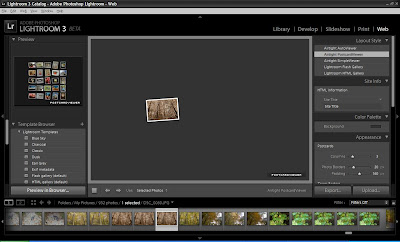
The first thing you'll want to do is click on the Web module in the upper right hand corner of the Lightroom 3 interface.
Once there it is as easy as choosing your photos, choosing a template / format to display them in and then customizing your site with things like title, description, contact information and many more options.
The first thing I did was to choose my Collection of random photos from the photo browser window near the bottom of the Lightroom 3 interface.

You can select multiple photos by holding the CTRL key and clicking on them. Under the "Use" option just above this drop down you can choose to use selected photos or an entire Collection.
Once you've selected your photos, you can choose the Layout Style in the top right hand side of the screen.
The options for layout styles are;



This module will assist you in preparing your photos in a collection to display on your website.
The first thing you'll want to do is click on the Web module in the upper right hand corner of the Lightroom 3 interface.
Once there it is as easy as choosing your photos, choosing a template / format to display them in and then customizing your site with things like title, description, contact information and many more options.
The first thing I did was to choose my Collection of random photos from the photo browser window near the bottom of the Lightroom 3 interface.

You can select multiple photos by holding the CTRL key and clicking on them. Under the "Use" option just above this drop down you can choose to use selected photos or an entire Collection.
Once you've selected your photos, you can choose the Layout Style in the top right hand side of the screen.
The options for layout styles are;
Airtight AutoViewer - a self contained look, one picture at a time, sliding right to left.

Airtight Postcard Viewer - similar to the one above, but it will have the photos looking as if they are scattered on a table, mouse over and they get larger and move, click on them to view in a similar style to the above layout style, click on them again to return to the postcard view.

Airtight Simple Viewer - a simple layout style with the photo thumbnails on the left, and selected photo in larger view on the right. Click to view full photo, click again to return to the main screen.

Lightroom Flash Gallery - This layout style offers very clean Flash based designs for the photo gallery. On the left hand side you can choose between many different templates for a custom look. The one pictured below is the Default Flash Gallery template, but there are many others to choose from... I'll show you the one I created at the bottom of the post.

Lightroom HTML Gallery - don't let this one fool you, there are some nice HTML Gallery templates that can be customized to come up with a very unique and stylish design.
Once you've selected your Layout Style, you can then set a myriad of options such as;
Site Info - set the name of the site, title of the collection and list contact information
Color Pallette - customize the look of the gallery site by changing border, title, text color and more
Appearance - change the look and feel of the thumbnails and full size photos
Image Info - choose to list the photo Title and Caption or other information about the photo such as exposure or other available image information fields
Output Settings - set copyright information, watermarks and sharepening
Upload Settings - setup your server connections to upload the final product directly from Lightroom to your site
Note: Be sure to select your template style before editing the above information. Choosing a new style afterwards will set all above information back to the default settings for the template.
Now that you've selected your template and edited the options to your liking, it's time to publish that masterpiece to the web. As long as you have all your connection information setup, just click Upload and then sit back and wait as Lightroom creates your site and uploads all necessary files to your server.
It can take a bit depending on how many photos you have selected and based on the output settings you have chosen. My site took approximately 30 minutes for Lightroom to create and publish.

Click here to see the live version.
Lightroom 3 has many great features that make it easy for a photographer to organize, edit, manipulate, categorize, and publish in multiple formats. This will definitely be an application that I'll pick up when it finishes the beta. Until then - go ahead and grab a copy and experiment for yourself to see how useful this application can be... and feel free to drop me a line to let me know your tips and tricks.
Thursday, January 14, 2010
Photography Goals for 2010
A blog post over at Digital Photography School led me to start thinking a bit about what I'd like to accomplish this year with my trusty Nikon D50. I picked the camera up several years ago and I love almost everything about it. I find that because it's not the smallest camera, I'm not as inclined to take it everywhere with me. I also worry about tempature changes during the winter months. I do however want to do more with it this year than I have in any of the past years and I do enjoy myself when trying to get that "perfect" shot.
So - in the blog, the author lists 30 photographic goals that one could use as ideas for your goals for 2010.
Although I like all the ideas in the list - I'll offer up 10 photographic goals that I'm going to make for myself this year based on my favorites from the list.
I'll post monthly summary entries to let you know how I'm progressing toward the goals.
Happy Shooting!
So - in the blog, the author lists 30 photographic goals that one could use as ideas for your goals for 2010.
Although I like all the ideas in the list - I'll offer up 10 photographic goals that I'm going to make for myself this year based on my favorites from the list.
- Shoot a Photo a Day - I don't know that I could do this for an extended period of time, but I will do this through February to see what comes of it. I'm more of a photo shoot kind of person, but this will be fun as it will challenge me to find at least one subject each day through the shortest month of the year. :)
- Prioritize your Goals - I like this idea. I think it would be good for me to sit down and give some thought to finding out what I enjoy most about photography and then making a plan to devote more time to it. I'd also like to save for a new Nikkor Lens this year.
- Read a book per month - Again, I think this is a great goal to strive towards. With so many areas to focus in on (no pun intended) it should be easy to achieve this goal. I'll post each month's book reviews up on this site.
- Join or Start a Photo Club - I'll look around the Washtenaw area and see what I can find. This will be a great way to get some advice and learn from others!
- Share Online - this is something that I haven't been great at... I'm probably way to critical and I just need to share my pictures with others. As you may have seen in a previous post, I've been working with Adobe Lightroom 3 and I really like it. The ability to publish to Flickr makes it easy to accomplish this goal.
- Create a Photo Book per Month - Well, a photo book per month may be a bit much, I will follow through with this one and set a goal to create at least two photo books this year. If it goes well and I enjoy the final work, maybe I'll make more.
- Get Published - This is by far the loftiest goal on the list. First - it assumes that my work will be worthy of being published. It's a good thing I still have eleven months to figure out how to accomplish this goal.
- Develop a Post Processing Workflow - this will be key if I want to be able to capture the best pictures from a photo shoot and share them with minimal amount of effort. I will spend time this month and next developing the way that works best for me.
- Make Personal Post Cards - This will be the goal that I'll tackle in the month of January. I received several Christmas Cards in 2009 from friends and family members and I didn't make the time to send cards back. I want to give a personal thank you to each person and I think this may be a great way to show that I really appreciated the effort of my loved ones.
- Take a Workshop - Yes, there is so much to learn! I plan on taking a workshop, perhaps locally or maybe a photo trip to another state.
I'll post monthly summary entries to let you know how I'm progressing toward the goals.
Happy Shooting!
Wednesday, January 13, 2010
February is Album Writing Month
February is Album Writing Month!
Do you think you're up to the challenge of writing 14 tunes in 28 days? If so, check it out.
For some history / more information - wikipedia can help out.
If you're not into writing an album, maybe you want to challenge yourself in different creative ways?
Let me know if you participate in any of these events, it would be great to track your progress.
Do you think you're up to the challenge of writing 14 tunes in 28 days? If so, check it out.
For some history / more information - wikipedia can help out.
If you're not into writing an album, maybe you want to challenge yourself in different creative ways?
Let me know if you participate in any of these events, it would be great to track your progress.
Subscribe to:
Posts (Atom)